Sample Architectures
This section describes how a Trust Service Provider (TSP) can integrate Primus HSM into their trust service environment, using Primus HSM as the certified CM and SAM. The focus is on the overall system architecture and the flows between the individual components.
This section begins by describing general dimensions along which architects should analyze their system design. Afterwards, multiple architecture options are proposed.
These architectures are provided for inspiration and as a starting ground. They are not binding, and TSPs are encouraged to modify and extend them to their needs.
Supported APIs
Recall from the previous section that Primus HSM uses Smart Key Attributes (SKA) to provide a SAM solution. SKA can be used with any of the following APIs. These APIs allow TSPs to integrate their software with Primus HSM.
- REST (through the TSB)
- Java JCE/JCA
- PKCS#11
Securosys recommends to use the REST API, because the TSB offers workflow management out-of-the-box. The TSB sits as an additional REST-to-JCE rewrite proxy in front of Primus HSM.
Note that for simplicity, the TSB is not always shown in the subsequent architecture proposals.

General Considerations
This subsection discusses general aspects that system architects should consider when designing a SAM system architecture using Primus HSM and SKA. In particular, designers should think about:
- How the SKA approver keys are generated, stored, and managed.
- How Signer Authentication is performed.
- How the SAD is created and passed to the SAM.
Primus HSM does not impose restrictions, as these aspects happen outside of the certified box. It is the responsibility of a TSP to discuss these with their auditor, to ensure that the overall system fulfills the requirements of EN 419241-1.
Keep these general aspects in mind when analyzing different architecture options.
Approver Keys
Recall that in SKA, every approver has an approver key pair. The private key is used to sign the approval token, which acts as the Signature Activation Data (SAD). Also recall that signer authentication is delegated to a trusted CA (that may be part of a larger PKI environment). Upon successful authentication, the trusted CA issues a certificate for the approver public key.
Where to generate the approver keys:
- Option 1: Locally on the SIC.
- The approver keys are generated by the SIC (for example, by the Secure Element of a smartphone).
- The SIC locally signs a CSR and uses it to request an approver certificate from a CA.
- Option 2: Remotely and injected into the SIC.
- The approver key can be generated remotely, and is securely transferred to and "injected" into the SIC.
- For example, some PKI system offer functionality where users download a PKCS#12 bundle containing both a private key and a corresponding certificate. The TSB also offers this functionality.
Where to hold the approver keys:
- Option 1: Locally on the SIC.
- The approver key pair can be stored and used locally on the Signer Interaction Component (SIC) within the signer's environment. In practice, this will be a web app or mobile app running on the signer's laptop or phone.
- The SAD is generated directly on the SIC, using the local approver key.
- Option 2: In the PKI environment.
- The approver key pair can also be stored and used locally on the delegated party that does signer authentication.
- The SAD is generated by the PKI in response to a successful signer authentication.
Lifetime:
The approver key pair can be either long-term (native mobile/desktop app) or short-term (web app). Recall that the HSM only verifies that the X.509 subject matches between the certificate in the SKA policy and the certificate in the signing request. Therefore, it is perfectly possible for a SIC to generate a fresh approver key pair for every single signing operation. Every new approver key pair needs to be certified by the trusted CA, subject to signer authentication (see below).
Signer Authentication
Recall that the SAM mode of Primus HSM delegates authentication to an external X.509 Certificate Authority (CA). The (Partition) Security Officers (PSO/SO) allow-list the CA in the Partition Security Configuration on the HSM.
The details of how this CA is operated and how it authenticates signers is up to the delegated party. The requirements are, among other things, that the authentication must be sufficiently strong (see SRA_SAP.1.1 and Annex A of EN 419241-1) and that the CA keeps its signing key in an HSM (see OE.DELEGATED_AUTHENTICATION of EN 419241-2). (For simplicity, the CA is not shown to use an HSM in the diagrams!) The TSP must ensure that these requirements are fulfilled by the delegated party.
Signature Activation Protocol
Recall from the eIDAS Definitions that the SAP is how the SIC and the SAM coordinate to create the SAD. As a system designer, you need to ensure that the requirement SRA_SAP.2.7 of EN 419241-1 is met.
The architectures below aim to achieve this, while showcasing different possible variants. They differ between what the SIC is, where the SAD is created, and how the SAD is transferred to the SAM.
For all of the options, the SIC is in the critical path. Without the SIC presenting valid identification/authentication to the delegated party (CA) or without compromising the SIC or the delegated party, it should not be possible to create a valid SAD. In particular, a compromised SSA should not be able to create a signature on behalf of a signer (such a system only fulfills SCAL1).
Architectures
Architecture 1: Client-Based Approvals
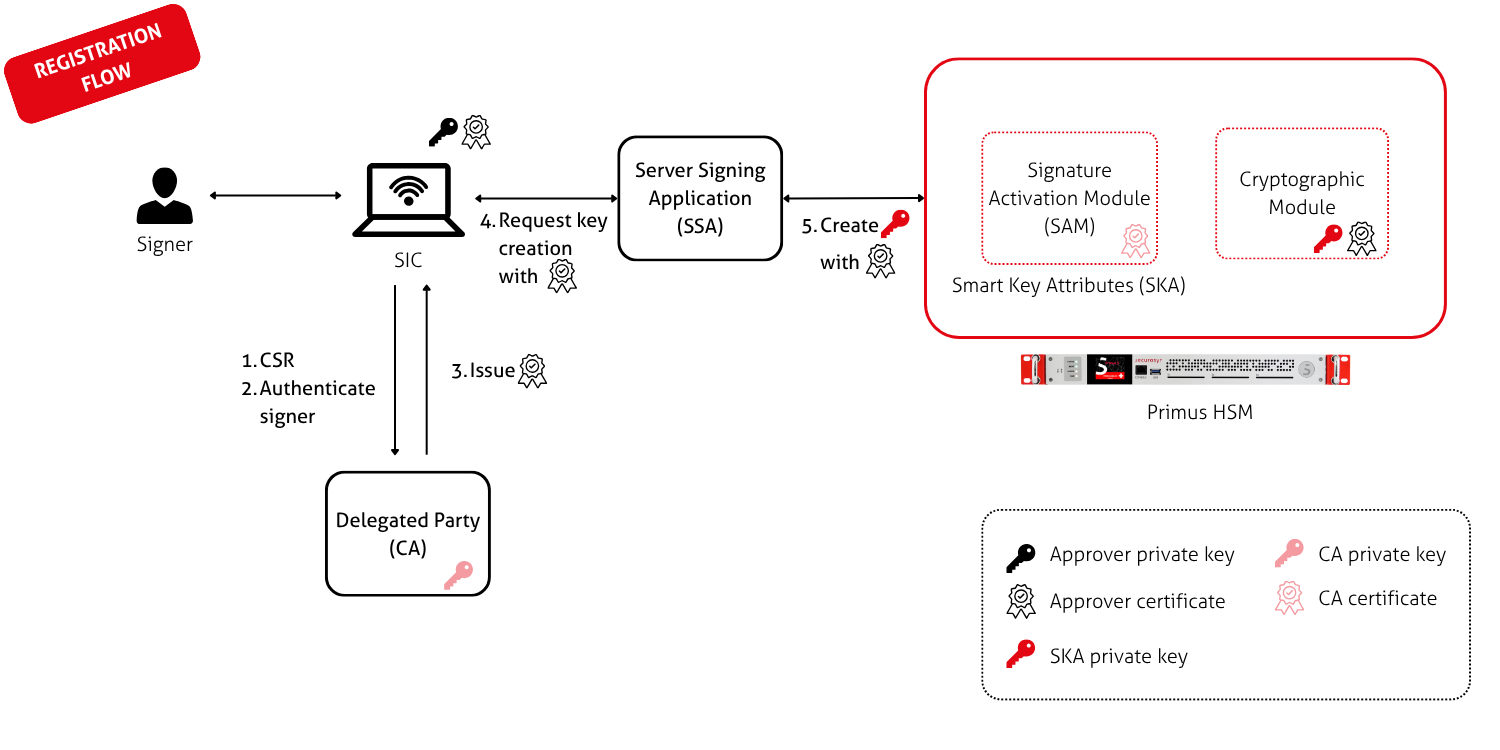
This is the simplest, most straight-forward architecture for integrating Primus HSM as a SAM and CM. It has a single CA as the delegated party. All SKA logic happens on the same device (usually, in the same browser) as the business application that triggered the signing request. Theoretically, the CA does not need to be aware of SKA. This allows the reuse of existing PKI environments.
Registration flow: The SIC locally generates an approver key pair. Then:
- SIC creates and signs a CSR and sends it to the CA.
- CA has some mechanism to authenticate the signer.
- After successful authentication, the CA issues the approver certificate.
- SIC then sends a key creation request (containing the certificate) to the SSA.
- SSA creates a new signing key on the HSM, placing the approver certificate into the SKA policy.
Usage flow:
- SIC locally constructs and signs the SKA approval (which acts as the SAD).
- SAD is sent to the SSA.
- SSA forwards the sign request and SAD to Primus HSM.
- SAM activates the signing key after verifying the SAD.
- CM signs the DTBS with the private key.
The CA is not involved anymore.
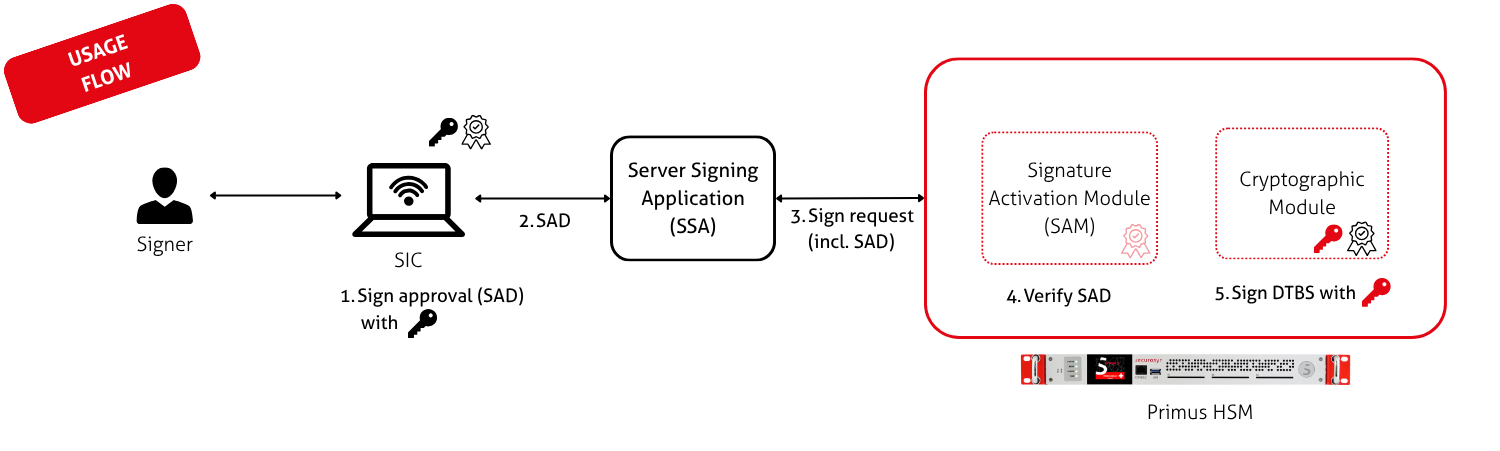
The SIC can be any user agent, such as a website, a native desktop app, or a mobile app.
If the SIC loses its state and forgets the approver private key (as is common with web applications, or users switching devices), the SIC simply re-runs the initial part of the registration flow. This results in a new approver key and certificate on the SIC. The signing key on the HSM can remain unchanged. This works because the HSM only checks that the subject in the approver certificate matches.
Optionally, the entire registration flow can be re-run, thus renewing the signing key on the HSM as well. This works because anyone who is verifying a qualified signature must anyway validate the entire signature chain. Therefore, they must be able to handle changing signing keys.
This can be taken to the extreme by generating a new signing key for every transaction and deleting it from the HSM immediately afterwards ("single-use SKA keys").
Architecture 2: Authorization App Approvals
The recommended architecture for normal SKA use cases (such as crypto currency wallets) is to have an Authorization App. SKA approvers use this app to review and approve/deny SKA requests. This architecture can also be applied to the SAM use case.
Compared to architecture 1, using an Authorization App brings the following modifications:
- Signers have a mobile app installed on their phone, which acts as the SIC. This is separate from the device that they are using to interact with the application requesting the signature.
- The approver keys are long-term and are kept in the Authorization App.
Registration flow: The registration flow is omitted in this architecture, because there are many possible variants. Instead, it is assumed that the Authorization App has already been provisioned with an approver key pair and a corresponding certificate. The approver key pair is either generated locally by the app or injected by the TSB. The approver certificate is issued by a trusted CA.
Usage flow:
- When there is a pending signature operation, the TSP backend (either the Server Signing Application (SSA) or the Securosys TSB) notifies the Authorization App of the pending approval task. The app fetches the task and notifies the signer.
- Signer reviews the request in the app and approves or denies it. If approved, the app signs the SAD.
- App returns it to the SSA/TSB.
- SSA/TSB forwards the sign request and SAD to Primus HSM.
- SAM activates the signing key after verifying the SAD.
- CM signs the DTBS with the private key.
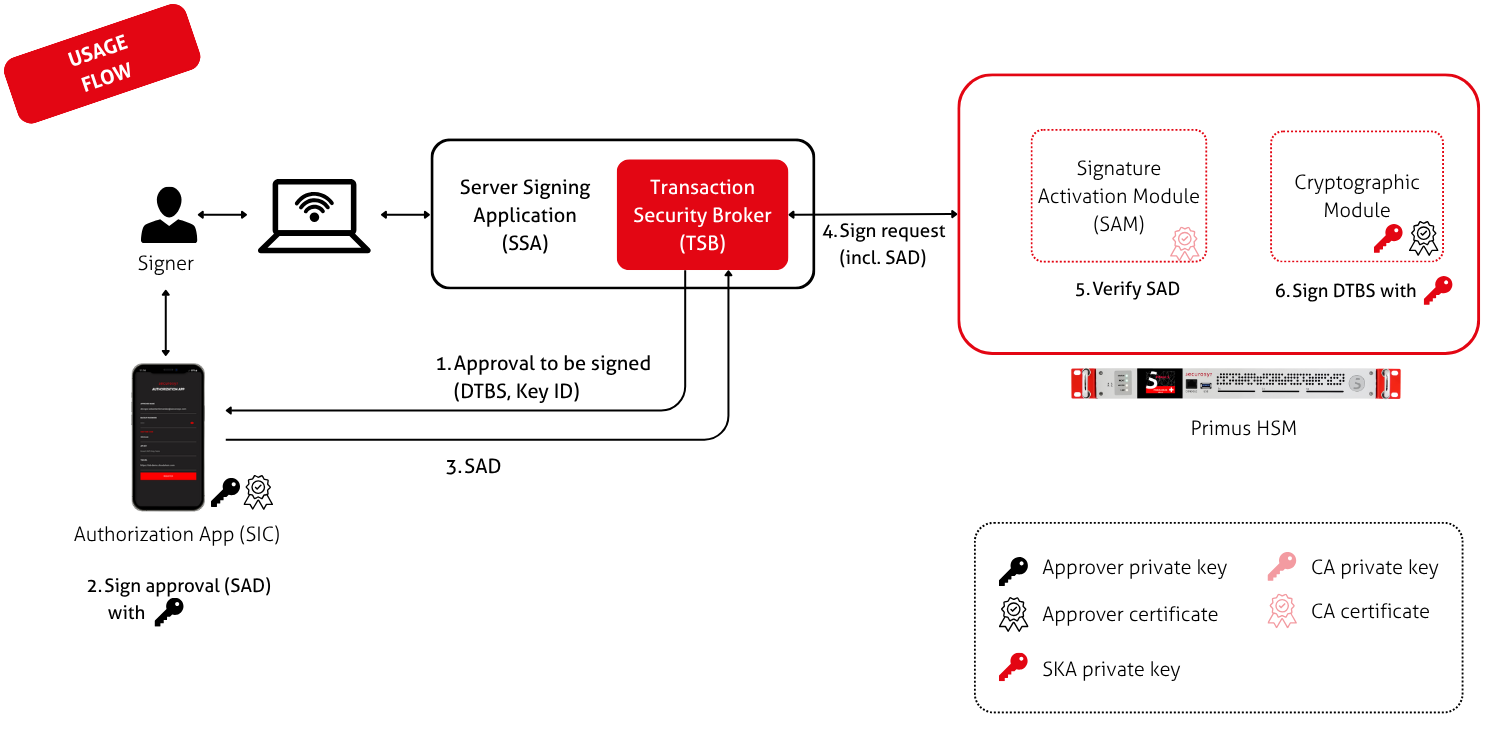
For demonstration and testing purposes, Securosys provides the Securosys Authorization App.
The TSB is the easiest way to use SKA, in particularly for m-of-n SKA policies (such as for Qualified Electronic Seals). Nevertheless, TSPs are free to write their own custom application that handles SKA workflow management.
Architecture 3: Extended PKI with IdP
In practice, a TSP may already have an existing Identity Provider (IdP) to which it can delegate authentication, using OIDC or a similar protocol. This can be achieved by extending the architecture so that signer authentication is performed by a larger PKI environment that consists of more than just a single CA. The OIDC IdP acts as a form of Registration Authority (RA) to which the CA delegates subscriber authentication. The CA can be configured to trust multiple different IdPs.
In all of the previous architectures, the CA component can be split up like this. For simplicity, this modification is explained and shown below only for architecture 1.
Registration flow: As in architecture 1, the SIC locally generates an approver key pair and signs a corresponding CSR. The SIC then performs a two-step flow: First, authenticate against the IdP. Second, forward the IdP assertion together with the CSR to the CA, to issue an X.509 certificate. For security reasons, it is recommended to cryptographically bind the CSR and the IdP assertion together in a way that the CA can verify. For example, the approver public key could be sent to the IdP to be included in the assertion (similar to OpenPubkey).
Usage flow: The usage flow looks the same as in Architecture 1 (because the CA/PKI is not involved).
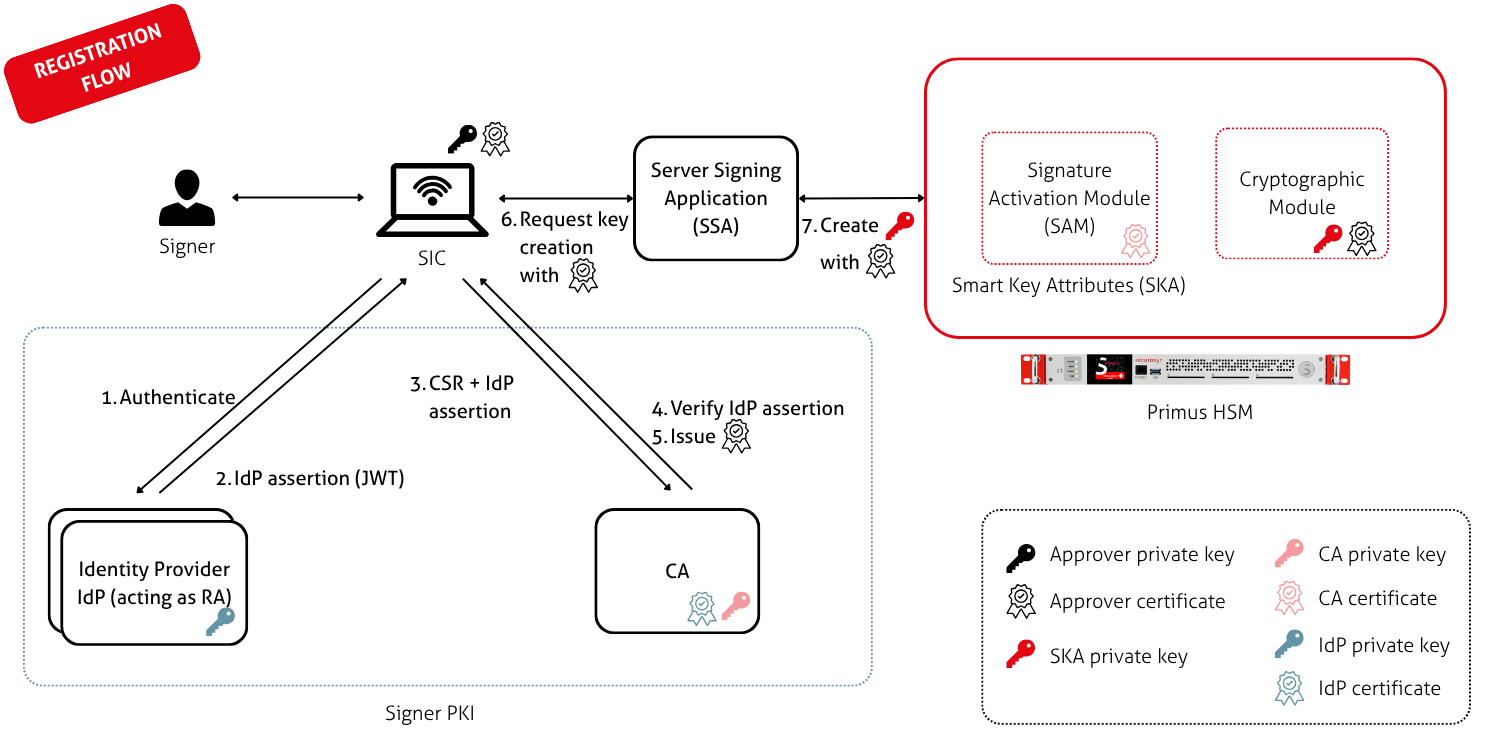
The TSP must ensure that this entire, combined PKI environment satisfies the requirements of delegated signer authentication.
An OIDC-based signer authentication flow could look as shown in the diagram below. For simplicity, the SSA is not shown. The CA also uses Primus HSM to store its CA signing key (ideally, in a separate partition).
Comparison
This section compares and contrasts the proposed architecture options, helping you choose between them.
Architectures 1 and 2 differ in where the SKA approvals are signed. This leads to the following pros and cons:
| Architecture | Pros | Cons | |
|---|---|---|---|
| 1 | Client-based |
|
|
| 2 | Authorization App |
|
|
Architecture 3 is orthogonal to 1 and 2. This means that you can use architecture 3 in combination with any of the other architectures. Use architecture 3 when you want to delegate signer identification/authentication to an existing IdP that you cannot modify (such as eID-based IdP). This allows you to move the additional code that SKA approvers require (such as a CA for approver certificate issuance) into a separate component in the delegated party environment.
It is important that the delegated party (CA) environment is separate from the Server Signing Application (SSA). If the SSA were to handle signer authentication as well as cryptographic operations (key creation, signing operations), then the SSA would once again be on the critical path. This risks downgrading the architecture to SCAL1.