eIDAS and SAM
Securosys Primus HSM and CloudHSM enable trust service providers to build secure, eIDAS-compliant remote signing solutions. Primus HSM is Common Criteria certified as a Cryptographic Module (CM) and a Signature Activation Module (SAM), and can thus be deployed as a Qualified Signature Creation Device (QSCD).
The eIDAS Regulation
The European Union's eIDAS regulation (Electronic Identification, Authentication, and Trust Services) establishes a common legal ground for electronic identification (eIDs) and trust services (electronic signatures, seals, timestamps, and website certificates) in the European single market.
Among other things, the eIDAS regulation aims to achieve:
- Inter-operability of eID and trust service schemes across borders.
- Legal equivalence of electronic signatures to hand-written signatures on paper.
To reach these goals and maintain trust, high security standards are required to protect the secret signing keys. Notably, these security requirements cannot be achieved with software alone. They require tamper-protected hardware, strict access control, and secure operating procedures.
eIDAS-compliant solutions fall into two deployment categories:
- Local signing: Secret key material is kept locally on small devices such as USB security tokens or smart cards. However, this decentralized approach puts burdens on users to manage these devices, install companion software to use them, and — most of all — not lose them.
- Remote signing: Secret key material is kept centrally on a Hardware Security Module (HSM). This is more convenient for users, since they don't need additional hardware and can log in via a simple mobile app or web interface. It also increases reliability and availability, since HSMs can be set up in a geo-redundant high availability cluster and since they are professionally managed by a Qualified Trust Service Provider (QTSP). Usually, the HSM is a network appliance, with a lot of storage and high performance, capable of serving hundreds of thousands to millions of users.
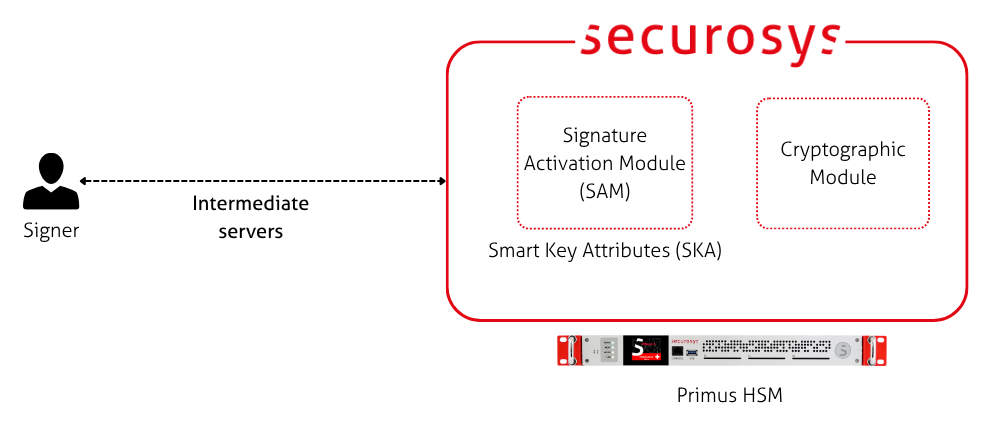
For remote signing, a cryptographic module that handles secure key storage and signing is not enough. A remote signing architecture also needs to ensure that human signers have sole control over their signing keys, despite the keys not being under their local, physical control. To achieve this so-called Sole Control Assurance Level 2 (SCAL2), a Signature Activation Module (SAM) is required. The SAM is deployed in a tamper-protected environment. It authenticates the human signer and ensures that data is only signed if the signer intended it.
Using Securosys HSMs for Trust Services
This is where Securosys comes in. On-premise Primus HSM or Securosys CloudHSM enable QTSPs to build high performance trust services compliant with eIDAS. Notably, Securosys HSMs provide both the Cryptographic Module (CM) and the Signature Activation Module (SAM) in a single box. The SAM is based on Securosys Smart Key Attributes (SKA). Together, the CM and the SAM form a Common Criteria certified Qualified Signature Creation Device (QSCD) — a core building block of every remote signing architecture.
Benefits of Using a Primus HSM for eIDAS
- Supports Qualified Electronic Signatures for individuals.
- Supports Qualified Electronic Seals for organizations: Define m-of-n policies to require multiple people to come together to sign on behalf of a company or institution.
- Compliance: Primus HSM is Common Criteria certified according to EN 419 221-5 (CM) and EN 419 241-2 (SAM).
- Single product: No need for a separate SAM solution: The built-in Smart Key Attributes (SKA) feature is certified as a SAM. SKA is used to control access to the signing keys, ensuring sole control of the legitimate signers.
- Flexible APIs: SKA is available via REST, JCE, and PKCS#11.
- High performance and high availability: Up to 30 GB of storage space, scaling to millions of transactions per second in a clustered setup.
- Future-proof: Includes support for Post Quantum Cryptography (PQC).
Get Started
- Read the concepts guide for a technical explanation of how to architect eIDAS solutions with Primus HSM.
- Follow the installation guide for setting up a Primus HSM for your eIDAS application.
- Look up the abbreviations in the glossary.