F5 BIG-IP
F5 BIG-IP is an Application Delivery Controller (ADC) that offers a broad range of advanced management and security services. Take advantage of options like load balancing, SSL/TLS offload, DNS, firewall and many more, to drastically increase the availability, security and performance of your applications.
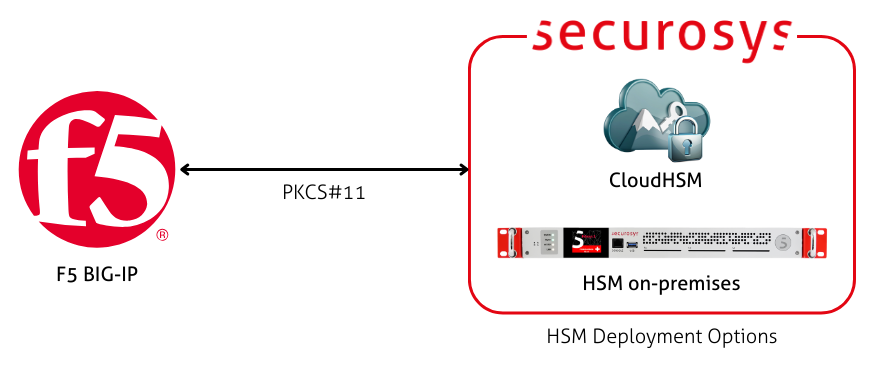
When integrated with a Securosys Primus HSM, you can store and manage your TLS private keys securely, allowing the ADC to offload the signing operations during TLS handshakes to the tamper-protected Primus HSM.
Benefits
- Enhanced Security: All private keys are generated and stored within the HSM Partition, ensuring that sensitive key material never leaves the HSM.
- High Joint Performance: F5 BIG-IP handles SSL/TLS termination while Primus HSM stores and signs with the private keys.
- Compliance: Meet regulatory requirements for hardware-backed key storage.
Prerequisites
In order to integrate your Primus HSM or CloudHSM with F5 BIG-IP, you need to meet the following minimum requirements:
- A configured Partition on your HSM, that is licensed for PKCS#11
- A licensed and configured F5 BIG-IP instance
- A network connection between the HSM and the F5 instance
This guide does not cover how to configure a F5 BIG-IP instance. Instead, it is assumes that this is already done. This guide only explains how to set up the Primus HSM as an External HSM for certificate management in F5.
Installation
First, ensure that your F5 instance is licensed for Network HSM VE:
tmsh show sys license
At a minimum, the External Interface and Network HSM, VE license should be listed.
Afterwards, configure the Primus PKCS#11 API Provider. Follow the Primus PKCS#11 Provider installation instructions to install and configure the provider on the F5 server.
You need to connect the F5 instance to the HSM Partition and fetch the permanent secret.
Use the ppin tool to fetch the permanent secret.
This is needed to fully complete the Primus PKCS#11 Provider installation.
Configuration
Next, configure F5 BIG-IP to begin using the Primus HSM for certificate management.
Create a new HSM vendor entry and specify the library file:
tmsh create sys crypto fips external-hsm \
vendor auto \
pkcs11-lib-path /usr/local/primus/lib/libprimusP11.so
Provide the Partition details:
tmsh create sys crypto fips \
nethsm-partition "<PARTITION_NAME>" \
password "<PKCS11-PASSWORD>"
The <PARTION_NAME> is the name of your HSM Partition.
The HSM Partition has the same name as the corresponding PKCS#11 token that is exposed by the Primus PKCS#11 Provider.
F5 uses the name "partition" to refer to this PKCS#11 token.
Test the Network HSM connection to your Partition:
tmsh run sys crypto nethsm-test --hsm-partition-name "<PARTITION_NAME>"
This will test the connection to the HSM, as well as key creation, usage and deletion. Here is a sample output:
[Info]: Begin
Testing on the partition with label: "PARTITION_NAME"
[Info]: Pass
[Sanity]: Begin
[Sanity]: Pass
[RSA2K]: Begin
[RSA2K]: Pass
[RSA4K]: Begin
[RSA4K]: Pass
[ECDSA_PRIME256v1_SHA256]: Begin
[ECDSA_PRIME256v1_SHA256]: Pass
[ECDSA_PRIME256v1_SHA384]: Begin
[ECDSA_PRIME256v1_SHA384]: Pass
[ECDSA_PRIME256v1_SHA512]: Begin
[ECDSA_PRIME256v1_SHA512]: Pass
[ECDSA_SECP384R1_SHA256]: Begin
[ECDSA_SECP384R1_SHA256]: Pass
[ECDSA_SECP384R1_SHA384]: Begin
[ECDSA_SECP384R1_SHA384]: Pass
[ECDSA_SECP384R1_SHA512]: Begin
[ECDSA_SECP384R1_SHA512]: Pass
Test Done(F=0)!
To view the details of the HSM connection, run:
tmsh list sys crypto fips
The output looks as follows:
sys crypto fips external-hsm {
num-threads 20
pkcs11-lib-path /usr/local/primus/lib/libprimusP11.so
vendor auto
}
sys crypto fips nethsm-partition <PARTITION_NAME> {
password $M$ok$K47/Wup98YmSL6g5R7Levw== # Hashed PKCS11 password
}
Usage
This section lists the commands for the most common management use cases.
Create a key inside the HSM:
tmsh create sys crypto \
key company-server-key \
key-type rsa-private \
key-size 4096 \
security-type nethsm \
nethsm-partition-name <PARTITION_NAME>
Create a certificate using the HSM backed key:
tmsh create sys crypto \
cert company-server-cert \
key company-server-key \
common-name "Company Test Crt" \
country CH \
state Zurich \
email-address "it@company.com"
Show an overview of each certificate:
tmsh show sys crypto cert
Show an overview of all available crypto commands:
tmsh list sys crypto ?
Modules:
cert-validator
fips FIPS specific configuration.
Options:
all-properties Display all properties for the specified items
current-module Do not recurse into sub-modes
non-default-properties Display properties that have non-default values
one-line Display each configuration item on a single line
recursive Include sub-folders recursively
Components:
acceleration-strategy Specifies acceleration-strategy setting.
allow-key-export Specifies whether or not to allow private key export.
ca-bundle-manager Certificate Authority (CA) certificate bundle manager.
cert Certificate configuration
cert-order-manager Certificate Manager
client Crypto client configuration.
crl Certificate revocation list configuration
csr Certificate Signing Request configuration
key Key configuration
server Crypto server configuration.
For more information on the available commands, please visit the F5 Commands Reference page.