Google Workspace Client-Side Encryption (CSE)
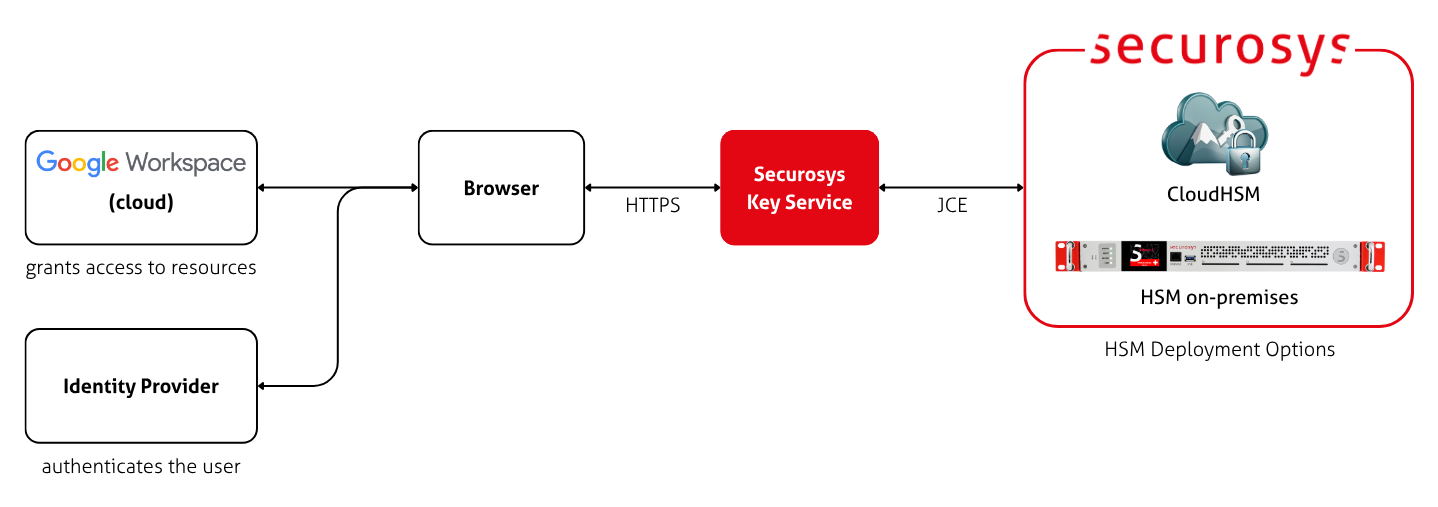
Google Workspace Client-Side Encryption (CSE) helps protect your emails, chats, meetings, files and more, by encrypting the content in the user's browser before sending it to Google. The key that protects this content is stored securely in a Securosys Primus HSM, called on by Google via a Key Access Control List Service (KACLS), also referred to as Key Service, whenever content is created or read.
How it works
After CSE is enabled for your organization, users can choose to create encrypted documents within Google Workspace, like Docs files, Meetings and emails, or encrypt files before uploading to Drive, such as PDFs.
Whenever a user needs to encrypt a file, the following happens:
- Google Workspace generates a Data Encryption Key (DEK) in the client browser to encrypt the content.
- Google Workspace sends the DEK and authentication tokens to your Key Service for encryption.
- The KACLS connects to your Primus HSM via the JCE API. The HSM encrypt (wraps) the DEK using a long-term wrapping key. It sends the encrypted DEK back to Google Workspace.
- Google Workspace stores the encrypted content and encrypted DEK in the cloud.
The reverse happens when decrypting a file.
Google and the Securosys Key Service never see your content in plaintext. Only the DEK is sent to the HSM, where it is wrapped/unwrapped. Only the wrapped DEK and the encrypted document are uploaded to Google. The HSM only stores the wrapping key.
Benefits
- Client-side encryption: Content is encrypted in the browser before it is sent to the Google cloud, ensuring that it remains private.
- Segregation of ownership: Google holds the content, the Key Service holds access to the wrapping key, the IdP provides authentication. All three have to agree to provide access to your encrypted content.
- Protect sensitive data on demand: Sensitive files, customer details, financial information, R&D data, and business secrets are unreadable without the HSM key.
- Auditable versioning: Because the browser sends a wrap request to the HSM on every file save, the audit log contains the full versioning state of every change and every time someone opens a file.
- Transparent work: Encrypting a file is a manual choice by your users. But once they make the choice, encryption happens transparently. Opening, editing, and sharing files all work the same as before.
- Wrapping key separate from data: The wrapping key is stored on the HSM, separate from the encrypted data that is stored in the cloud.
Limitations
- Disabling, blocking, or deleting the wrapping key in the HSM immediately removes access to encrypted content for your whole tenant.
- If the Key Service is unable to validate either JWT, requests fail.
- CSE works only on some browsers. Verify compatibility with the Google Workspace Supported Browser list.
- CSE is only available with the following licenses: Enterprise Plus, Frontline Plus, Education Standard or Education Plus.
- Certain features are not available on encrypted content. When choosing to encrypt, a disclaimer is shown per application.