MariaDB Integration
This shows how to set up database encryption for MariaDB using HashiCorp Vault, backed by a Primus HSM. This is done using the HashiCorp Key Management Plugin for MariaDB.
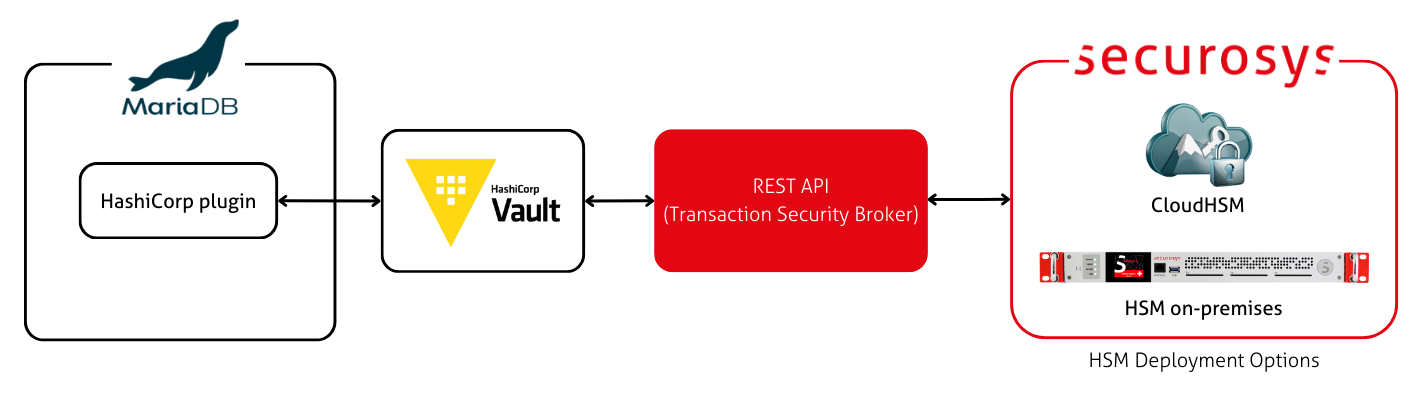
It is also possible to set up MariaDB encryption via the Securosys plugin instead of via the HashiCorp plugin.
Using the HashiCorp plugin has the advantage of having HashiCorp as a central key management platform. The disadvantage is that HashiCorp introduces an additional layer of indirection.
Prerequisites
- A Primus HSM or CloudHSM
- An installation of MariaDB
- An installation of HashiCorp Vault, e.g. at
https://localhost:8200 - The Securosys Secrets Engine installed in HashiCorp Vault
Steps
-
Register a key with HSM label
MariaDBEncryptionKeyunder the namemariadb_encryption_keyin the Secrets Engine.This key acts as a "root key". In this example, we use an RSA key, because Primus HSM supports Smart Key Attributes (SKA) only for asymmetric keys. Using an SKA as a root key (not shown here) allows you to build authorization policies that need to be fulfilled in order to decrypt your MariaDB database.
The Securosys Secrets Engine supports asynchronous decrypt operation using SKA keys. The engine will pause the decrypt operation and wait for the approvals to be collected.
- CLI
- REST
$ vault write securosys-hsm/keys/rsa/mariadb_encryption_keykeyLabel="MariaDBEncryptionKey"keySize=4096attributes='{"decrypt": true,"sign": false,"unwrap": false,"derive": true,"sensitive": true,"extractable": false,"modifiable": false,"copyable": false,"destroyable": true}'curl --location --request PUT 'https://localhost:8200/v1/securosys-hsm/keys/rsa/mariadb_encryption_key' \--header 'X-Vault-Token: ${token}' \--header 'Content-Type: application/x-www-form-urlencoded' \--data-urlencode 'keyLabel=MariaDBEncryptionKey' \--data-urlencode 'keySize=4096' \--data-urlencode 'attributes={"decrypt": true,"sign": false,"unwrap": false,"derive": true,"sensitive": true,"extractable": false,"neverExtractable": true,"modifiable": false,"copyable": false,"destroyable": true}' -
Generate new secret called
mariadb_secretand encrypt it using the keymariadb_encryption_keyfrom the Secrets Engine.- CLI
- REST
$ vault write securosys-hsm/integrations/mariadb/mariadb_secretkeyName=mariadb_encryption_keycipherAlgorithm=AES[additionalAuthenticationData={additional-authentication-data}][tagLength={tag-length}][password={password-for-a-key}]curl --location --request PUT 'https://localhost:8200/v1/securosys-hsm/integrations/mariadb/mariadb_secret ' \--header 'X-Vault-Token: ${token}'--header 'Content-Type: application/x-www-form-urlencoded' \--data-urlencode 'keyName=mariadb_encryption_key' \--data-urlencode 'cipherAlgorithm=AES'--data-urlencode 'tagLength={tag-length}' \--data-urlencode 'additionalAuthenticationData={additional-authentication-data}' \--data-urlencode 'password={password-for-a-key}'tipEvery request to this endpoint using same key name and secret name will rotate the secret.
-
Configure MariaDB using its
my.cnformariadb.cnfconfig file. Configure MariaDB to load the plugin, configure the plugin options, and configure MariaDB to enable database encryption.Using the
loose-prefix is optional.[mariadb]plugin-load-add=hashicorp_key_management.so# Configure the HashiCorp pluginloose-hashicorp-key-managementloose-hashicorp-key-management-vault-url="https://localhost:8200/v1/securosys-hsm/integrations/mariadb/mariadb_secret/?key_name=mariadb_encryption_key&cipher_algorithm=RSA&version="# loose-hashicorp-key-management-vault-url="{vault_address}/v1/securosys-hsm/integrations/mariadb/{secret_name}/?key_name={key-name}&cipher_algorithm={cipher_algorithm}&tag_length={tag_length}&aad={additional_authentication_data}&password={password}&version="loose-hashicorp-key-management-token="{vault_access_token}"loose-hashicorp-key-management-check-kv-version="off"# max timeout is 86400 secondsloose-hashicorp-key-management-timeout=3000loose-hashicorp-key-management-retries=0loose-hashicorp-key-management-use-cache-on-timeout="on"loose-hashicorp-key-management-caching-enabled="on"# 1 year in milisecondsloose-hashicorp-key-management-cache-timeout=31556952000loose-hashicorp-key-management-cache-version-timeout=31556952000# Enable InnoDB encryptioninnodb_encrypt_tables = ONinnodb_encrypt_temporary_tables = ONinnodb_encrypt_log = ONinnodb_encryption_threads = 4innodb_encryption_rotate_key_age = 1infoThe
loose-hashicorp-key-management-vault-urlmust end with &version=. The HashiCorp plugin will automatically add the secret version (used for key rotation) to the URL.