IBM Db2
IBM Db2 is a relational database that stores structured data in tables, queried with SQL. It is used for transactional and analytical workloads across on-premise and cloud deployments.
This guide showcases how you can enable data encryption in IBM Db2, protected by a master key that is accessed via the Securosys KMIP Server, is stored on a Securosys Primus HSM or CloudHSM, and is managed through CyberVault KMS.
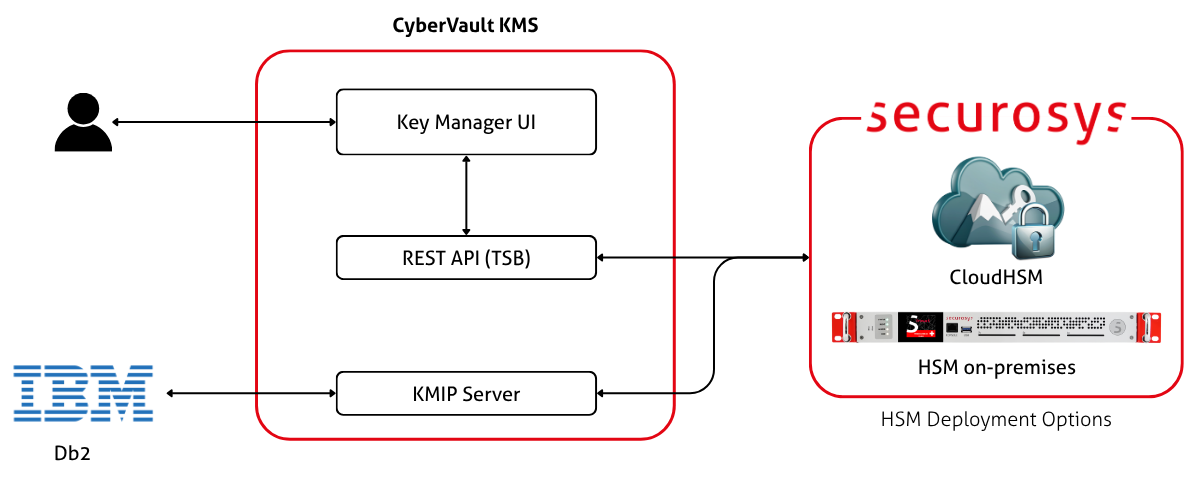
Encryption options in IBM Db2
IBM Db2 offers several ways to protect data, each addressing a different threat. They are complementary to each other.
| Option | Layer | What it protects against |
|---|---|---|
| Native encryption | Instance, storage engine | Physical access to the data: stolen or decommissioned drives, copied storage paths, backup images |
| Encryption of data in transit (TLS) | Network | Securely transmit data between servers and clients |
| SQL column functions | Application, per column | Exposure of individual column values |
Native encryption is transparent to applications and covers the whole database on disk. The other two are narrower: column functions protect selected values through the application, and TLS protects data on the wire.
This guide only covers native encryption, which is the encryption-at-rest feature in IBM Db2. Column functions and TLS are configured separately and are out of scope for this guide.
How it works
Native encryption encrypts all data in the database, along with its transaction logs and backup images, before it is written to disk. The encryption is transparent to the application: no schema changes, no driver changes, and no query changes. Data is encrypted when written to disk and decrypted when read back into memory.
Db2 uses an envelope encryption model consisting of two types of keys:
| Key | Purpose |
|---|---|
| Master key | Generated in CyberVault KMS, where it is protected by the Securosys HSM, and accessed via KMIP. Wraps the database's DEK. Cached by Db2 in-memory, but is never persisted to disk. |
| Data encryption key (DEK) | Generated by Db2, one per database, stored encrypted inside the database and wrapped by the master key. Encrypts the actual table spaces, logs, and backups. |
A connection to the KMIP Server is only needed at database creation, activation, and master key rotation. Because the master key is cached, database queries do not need a round-trip to the KMIP Server.
Each database has a single master key. In a Db2 high availability disaster recovery (HADR) setup, both the primary and standby databases are encrypted and both instances need keystore access. When HADR starts, Db2 synchronizes the standby's master key with the primary's.
Benefits
When your Db2 master key is managed on a Securosys Primus HSM or CloudHSM, you take advantage of the following benefits:
- Encrypt your data at rest: all data in the database, its transaction logs, and backup images are encrypted on disk.
- Fully transparent to the application: no code, schema, or query changes are required.
- Protect sensitive data: personal information, customer details, financial information, and business secrets are unreadable in a stolen or decommissioned disks or backup images.
- The master key is never stored with the data: it stays on the HSM, physically separate from the encrypted database it protects.
- Rotate the master key without re-encrypting the entire dataset: only the DEK is re-wrapped.
- No additional license: native encryption is included in all Db2 editions from Db2 11.1.
- Ease of key management with KMS: the Securosys CyberVault KMS provides an intuitive UI for key lifecycle management.
Limitations
Keep the following in mind before deploying native encryption:
- If the master key cannot be fetched because the KMIP Server or the HSM is unavailable, the database will fail to start.
- It protects data on disk only. Data is decrypted into memory when read, so anyone able to read process memory can see the plaintext.
- It does not defend against a compromised application. All SQL queries return the plaintext data.
- It does not protect data in-transit. You still need to deploy TLS between Db2 and your applications.
Get Started
Follow the installation guide to learn how to connect your IBM Db2 instance a Securosys HSM through the Securosys KMIP Server.
Read about native encryption from the IBM Db2 documentation.