Configure Infisical KMS
This guide explains how to configure Infisical to create its KMS root key in a Securosys HSM.
This tutorial assumes that Infisical already runs, either with Docker Compose or on Kubernetes, and that you have met the prerequisites. See the Infisical documentation for how to install Infisical.
Both deployments configure the same four HSM_* variables and reach the HSM through the same
Primus PKCS#11 Provider. They differ only in how the Provider is delivered to the Infisical server:
Docker mounts it from the container host, while Kubernetes stages it into a volume.
- Configure using Docker
- Configure using Kubernetes
Step 1: Prepare group membership
The Infisical image runs as non-root-user (UID 1001, group nodejs).
It needs to be added to the primus group to be able to access the Primus PKCS#11 Provider.
However, the primus group does not exist inside the container image by name.
Therefore, you need to find out its numeric group ID.
On the container host, run the following:
$ getent group primus
primus:x:989:alice,bob
Note down the group ID (here: 989).
Step 2: Set up environment variables
Add these to the .env file of your Infisical deployment:
LICENSE_KEY=${LICENSE_KEY}          # enterprise license key required for HSM encryption

HSM_SLOT=0                          # as per slot-id from `ppin -l`
HSM_KEY_LABEL=infisical-kms-root    # key label to be created in the HSM
HSM_PIN=secret-pkcs11-pin           # the PKCS#11 password for your Partition

PRIMUS_GID=989                      # obtained above
Step 3: Docker Compose
Mount the Primus PKCS#11 Provider and its configuration files into the Infisical container, and point Infisical at the provider.
Add the following to the Docker Compose service block:
services:
  backend:
    container_name: infisical-backend
    # other fields omitted
    # ...
    environment:
      HSM_LIB_PATH: /usr/local/primus/lib/libprimusP11.so
      SECUROSYS_PKCS11_CONF: /etc/primus/primus.cfg
      SECUROSYS_SECRETS_CONF: /etc/primus/.secrets.cfg
    volumes:
      - /usr/local/primus/lib:/usr/local/primus/lib:ro
      - /etc/primus:/etc/primus:ro
    group_add:
      - "${PRIMUS_GID}"
Restart the container to apply the changes:
docker compose up -d
Step 4: Switch the encryption strategy to HSM
- Sign in as a server administrator and open the Server Console.
- Go to Encryption.
- Set the strategy to Hardware Security Module (HSM) and save.
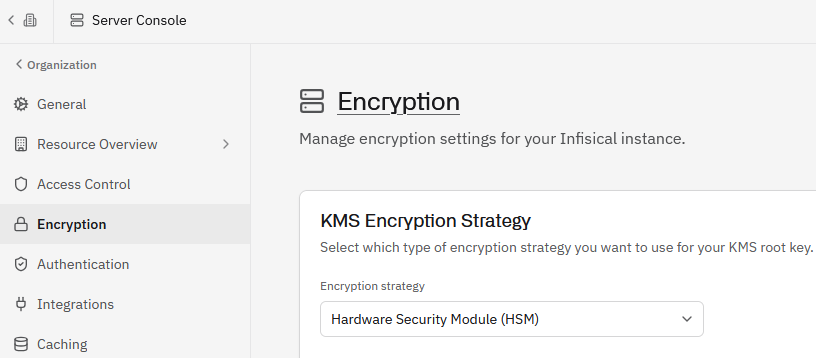
Infisical automatically creates infisical-kms-root and infisical-kms-root_HMAC
in the Partition and re-encrypts its KMS key under the HSM.
Step 5: Testing
The root key is used when the instance starts, and the HSM reports key usage once the PKCS#11 session closes. Restart the container to produce both for initial verifications:
docker compose restart infisical-backend
docker compose logs infisical-backend | grep -E 'PKCS#11|HSM:|ROOT Key'
"msg":"PKCS#11 module initialized"
"msg":"HSM: Successfully authenticated"
"msg":"HSM: Terminated session successfully"
"msg":"KMS: Loading ROOT Key into Memory."
These steps use the infisical-standalone Helm chart
and were verified against chart version 1.12.2.
No group membership is required on Kubernetes.
The Provider is staged into a volume rather than mounted from a node,
and the chart's podSecurityContext.fsGroup: 1001 makes the staged files readable by the Infisical container.
This replaces the group_add step of the Docker deployment.
Step 1: Create a volume for the Primus PKCS#11 Provider
The Primus PKCS#11 Provider is staged into a volume that the Infisical pods mount, so no cluster node needs the Primus PKCS#11 Provider installed. Create the claim in the namespace Infisical runs in:
apiVersion: v1
kind: PersistentVolumeClaim
metadata:
  name: primus-provider-pvc
spec:
  accessModes:
    - ReadWriteOnce
  resources:
    requests:
      storage: 128Mi
kubectl apply -f primus-provider-pvc.yaml
A ReadWriteOnce volume can only be mounted by pods on one node, so it supports a single Infisical replica.
To run two or more replicas across nodes, request the volume from a ReadWriteMany storage class instead.
Step 2: Stage the Primus PKCS#11 Provider into the volume
Start a temporary pod with the volume attached:
apiVersion: v1
kind: Pod
metadata:
  name: primus-setup
spec:
  securityContext:
    fsGroup: 1001
  containers:
    - name: setup
      image: busybox:1.36
      command: ["sleep", "3600"]
      volumeMounts:
        - name: primus-provider
          mountPath: /data
  volumes:
    - name: primus-provider
      persistentVolumeClaim:
        claimName: primus-provider-pvc
  restartPolicy: Never
kubectl apply -f primus-setup-pod.yaml
kubectl wait --for=condition=Ready pod/primus-setup --timeout=120s
Copy in the Primus PKCS#11 Provider library and primus.cfg from a host that has the Provider installed.
The installed library is a symlink chain (libprimusP11.so to .so.2 to .so.2.8.2),
so dereference it with cp -L first; kubectl cp does not follow symlinks out of the source tree.
mkdir -p stage/lib stage/etc
cp -L /usr/local/primus/lib/libprimusP11.so stage/lib/
cp -L /etc/primus/primus.cfg stage/etc/

kubectl exec primus-setup -- mkdir -p /data/lib /data/etc
kubectl cp stage/lib/. primus-setup:/data/lib/
kubectl cp stage/etc/. primus-setup:/data/etc/
kubectl exec primus-setup -- chmod -R a+rX /data
Confirm the library arrived intact, then delete the temporary pod:
$ kubectl exec primus-setup -- sha256sum /data/lib/libprimusP11.so
e372313669ba1ddd4030ac04eb14aa525a0d4c982df387d2ac7ac36254a877e4  /data/lib/libprimusP11.so
$ sha256sum /usr/local/primus/lib/libprimusP11.so
e372313669ba1ddd4030ac04eb14aa525a0d4c982df387d2ac7ac36254a877e4  /usr/local/primus/lib/libprimusP11.so
kubectl delete pod primus-setup
Do not copy .secrets.cfg into the volume.
A PersistentVolumeClaim is not encrypted at rest by the cluster,
and its contents are readable by anything that can mount it.
Instead store the connection secret like this:
kubectl create secret generic primus-secrets-cfg \
  --from-file=.secrets.cfg=/etc/primus/.secrets.cfg
Step 3: Set up environment variables
Add these to the infisical-secrets Secret that the chart reads,
alongside the values your deployment already sets, such as ENCRYPTION_KEY, AUTH_SECRET and SITE_URL:
apiVersion: v1
kind: Secret
metadata:
  name: infisical-secrets
type: Opaque
stringData:
  # other variables omitted
  # ...
  LICENSE_KEY: ${LICENSE_KEY}                                     # enterprise license key required for HSM encryption

  HSM_LIB_PATH: /usr/local/primus/lib/libprimusP11.so
  HSM_SLOT: "0"                                                   # as per slot-id from `ppin -l`
  HSM_KEY_LABEL: infisical-kms-root                               # key label to be created in the HSM
  HSM_PIN: secret-pkcs11-pin                                      # the PKCS#11 password for your Partition

  SECUROSYS_PKCS11_CONF: /usr/local/primus/etc/primus.cfg
  SECUROSYS_SECRETS_CONF: /etc/primus-secret/.secrets.cfg
kubectl apply -f infisical-secrets.yaml
Step 4: Update the Helm values
Mount the volume from Step 1 and the Secret from Step 2 into the Infisical pods:
infisical:
  # The Provider volume is ReadWriteOnce; see Step 1 before raising this.
  replicaCount: 1

  extraVolumes:
    - name: primus-provider
      persistentVolumeClaim:
        claimName: primus-provider-pvc
    - name: primus-secrets-cfg
      secret:
        secretName: primus-secrets-cfg
        defaultMode: 0440

  extraVolumeMounts:
    - name: primus-provider
      mountPath: /usr/local/primus
      readOnly: true
    - name: primus-secrets-cfg
      mountPath: /etc/primus-secret
      readOnly: true
extraVolumes and extraVolumeMounts are nested under the infisical key.
On chart versions before 1.8.0 they are top-level keys instead.
Apply the values and restart the deployment:
helm upgrade --install infisical infisical-helm-charts/infisical-standalone --values values.yaml
kubectl rollout restart deployment/infisical-infisical-standalone-infisical
Step 5: Switch the encryption strategy to HSM
- Sign in as a server administrator and open the Server Console.
- Go to Encryption.
- Set the strategy to Hardware Security Module (HSM) and save.
Infisical automatically creates infisical-kms-root and infisical-kms-root_HMAC
in the Partition and re-encrypts its KMS key under the HSM.
On a new instance whose HSM_* variables are already set,
Infisical adopts the HSM strategy on its first start and creates both keys then, so this step has nothing left to do.
Step 6: Testing
The root key is used when the instance starts, and the HSM reports key usage once the PKCS#11 session closes. Replace the pod to produce both for initial verifications:
kubectl rollout restart deployment/infisical-infisical-standalone-infisical
kubectl logs deployment/infisical-infisical-standalone-infisical | grep -E 'PKCS#11|HSM:|ROOT Key'
"msg":"PKCS#11 module initialized"
"msg":"HSM: Successfully authenticated"
"msg":"HSM: Terminated session successfully"
"msg":"KMS: Loading ROOT Key into Memory."
If a new pod cannot reach the Partition it fails its readiness probe, and the deployment keeps the previous pod serving traffic rather than completing the rollout. A misconfigured upgrade shows up as a stalled rollout, not an outage.
Verifying the keys in the Partition
The HSM records usage against the two keys, when an operation is performed, for example creation of a secret:
Key Name: infisical-kms-root, Encrypt: 1, Decrypt: 1
Key Name: infisical-kms-root_HMAC, Sign: 1, Verify: 1
You can list the keys inside your HSM Partition to verify that Infisical has created them there:
pkcs11-tool --module /usr/local/primus/lib/libprimusP11.so --token-label ${PARTITION_NAME} --login --list-objects --type secrkey
Secret Key Object; AES length 32
  label:      infisical-kms-root
  Usage:      encrypt, decrypt
  Access:     sensitive, always sensitive, never extractable, local
Secret Key Object; Generic secret length 32
  label:      infisical-kms-root_HMAC
  Usage:      sign, verify
  Access:     sensitive, always sensitive, never extractable, local
Creating a secret in a project produces no HSM activity. Each secret is encrypted with a project key that the KMS key protects, and only the KMS key is wrapped by the root key in the HSM.
Once Infisical uses the HSM strategy, the HSM is a hard dependency. If the Partition or its two keys are lost, the data in Infisical cannot be decrypted. Switching back to software encryption also requires access to the HSM. Make sure the Partition is backed up or replicated before storing production secrets.