Create a Crypto Token
In this section, you will learn how to connect Keyfactor EJBCA to your Securosys HSM by adding the HSM as a "Crypto Token" to EJBCA.
Navigate to your EJBCA Admin Web interface: https://your-ejbca-server.example.com:8443/ejbca/adminweb.
In the EJBCA menu, under "CA Functions", select "Crypto Tokens". Then select "Create new".
Specify the following values on the New Crypto Token page, depending on the API you are using:
- PKCS#11 API
- REST API
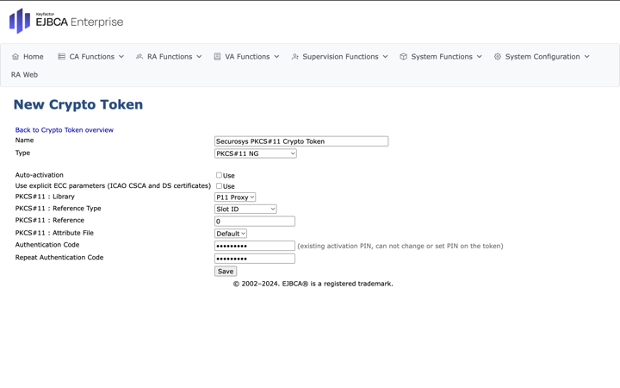
- Enter a name for the New Crypto Token.
- Select
PKCS#11 NGfrom the type dropdown list. - Select
Auto-activationto keep the partition connected when EJBCA is restarted. - Select
P11 Proxyfrom the library dropdown list. - Select
Slot IDfrom the reference type dropdown list. - Enter the slot reference, as defined in the
primus.cfgfile when you installed and configured the PKCS#11 Provider. - Select
Defaultfrom the attribute file dropdown list. - Enter the
PKCS#11 Passwordtwice for the HSM partition. - Click
Saveto create the New Crypto Token.
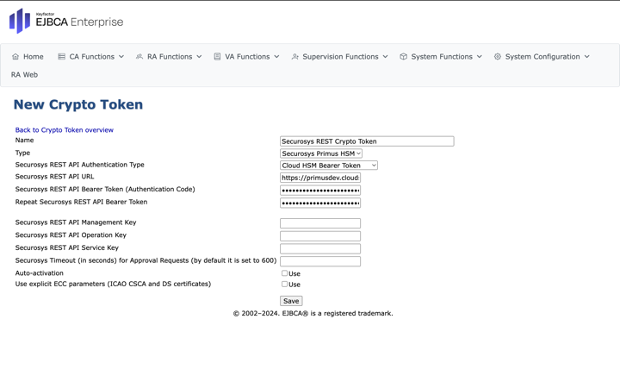
- Enter a name for the New Crypto Token.
- Select
Securosys Primus HSMfrom the type dropdown list. - Select the REST API authentication type based on your HSM setup — for example, use
Bearer Tokenfor Securosys CloudHSM ormTLS Certificatefor on-premises Securosys Primus HSM. - Enter the Securosys REST API URL.
- Based on your HSM setup, enter the Bearer Token or mTLS Certificate twice.
- Select
Auto-activationto keep the partition connected when EJBCA is restarted. - Click
Saveto create the New Crypto Token.
Your New Crypto Token is now available for use in EJBCA.
Next Steps
For more information on the EJBCA setup, best practices and how to generate key pairs, refer to Keyfactor EJBCA Documentation.