KMIP Server Storage
The Securosys KMIP Server uses three storage locations to persist information: a local config file, an HSM Partition, and a database. This page describes what types of data these different locations store.
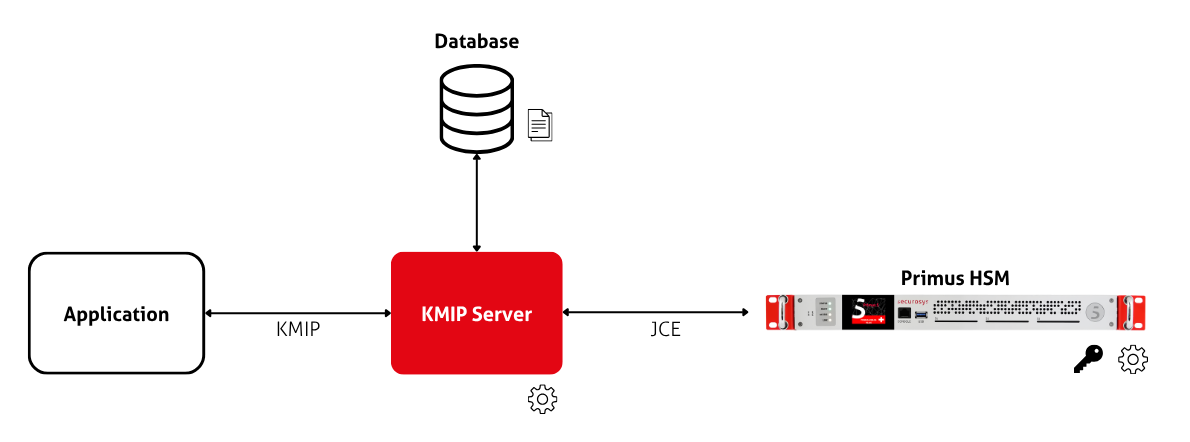
Storage Locations
Local Configuration File
The local configuration file contains the minimum information that the KMIP Server needs to start and to connect to the Base Partition on the HSM. This includes the URL/port of the HSM and the name/blinded secret of the Partition.
HSM Base Partition
The KMIP Server is assigned a Base Partition on the HSM. Inside this Partition, the KMIP Server stores the majority of its global state using Data Objects. For example, these include:
kmipserver.properties- majority of the server configuration: TLS, database, protocol options, login credentials for additional PartitionsKMIP-USERS- registry of the KMIP clientsinit.json- trust seed with the KMIP clients and their groups- The server keystore - TLS certificate and private key that the server presents to clients
- The server truststore - client CA that the server accepts in the mTLS handshake
When it starts, the KMIP Server authenticates to this Partition using the values
of primus.user and primus.password from the local kmipserver.properties file.
Afterwards, the server reads the rest of the configuration from the data objects on the Base Partition.
It merges them on top of its local configuration files, which only serve as a bootstrap.
The HSM is the source of truth for the KMIP Server configuration.
Always edit the settings through the Key Manager UI (see the Management section). Never edit the Data Objects manually!
This is also why the Base Partition of the KMIP Server must match the Base Partition of the Key Manager UI.
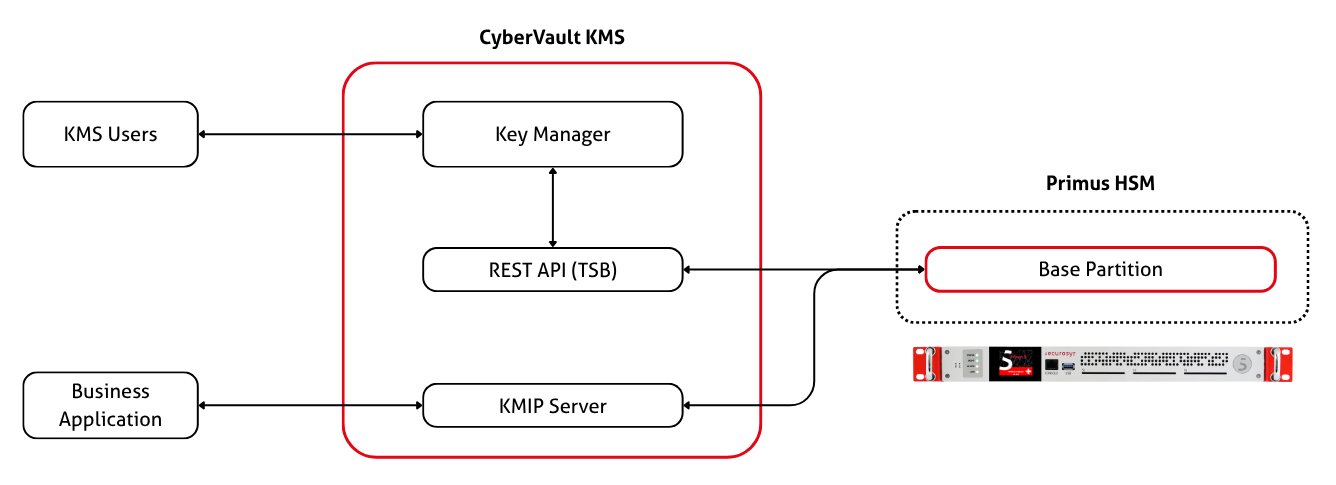
The cryptographic material (keys, certificates, ...) created by the KMIP clients are stored on the Partition that the client is assigned to. This can either be the Base Partition or one of the additional Partitions.
Relational Database
Additionally, the KMIP Server uses a relational database to cache information. It stores object attributes and metadata, client credentials, and access control information. For more details, see the database reference.
Backup & Recovery
Because all important information is stored in the Base Partition (and the database is a cache), it is sufficient to back up the Base Partition. Therefore, the KMIP Server benefits from all of Primus HSM's native mechanisms, such as device backups and high availability clustering.
To restore a broken KMIP Server installation, simply:
- Reinstall the KMIP Server from scratch.
- Create a fresh, empty database.
- Use the local config file to connect the server to the same Base Partition.
- The KMIP Server should find the existing Data Objects on the Base Partition, and recover all settings, KMIP clients, etc. from them. It will gradually re-populate the database.