HSM-backed State and Secrets
CyberVault KMS stores its state in data objects on the HSM instead of an external database.
These objects hold the Key Manager's own runtime state such as configuration, user and MFA state, partition registry data, and integration secrets. They govern how the service behaves after restart or unseal.
Their persistence is covered by the HSM's normal clustering and backup mechanisms, so no separate database-style backup process is needed for Key Manager state. Even though the data objects use up storage on the partition, the footprint is small because they are control-plane objects rather than bulk application data.
Because they are plain data objects, they are visible through the normal HSM API interfaces. This documentation explains which data objects exist, how they are named, and what purpose they serve. This helps operators understand the objects that they see on their HSM partition.
For an operator, the important question is usually:
- which data object should I inspect
- what kind of content should I expect there
- which objects contain plaintext metadata versus sealed or encrypted content
The easiest way to inspect the HSM keystore is through the Retrieve Data Object API on the TSB. This should mainly be used for inspection, troubleshooting, or break-glass recovery.
Do not attempt to edit these data objects directly. Instead, use the Key Manager UI or API to edit them.
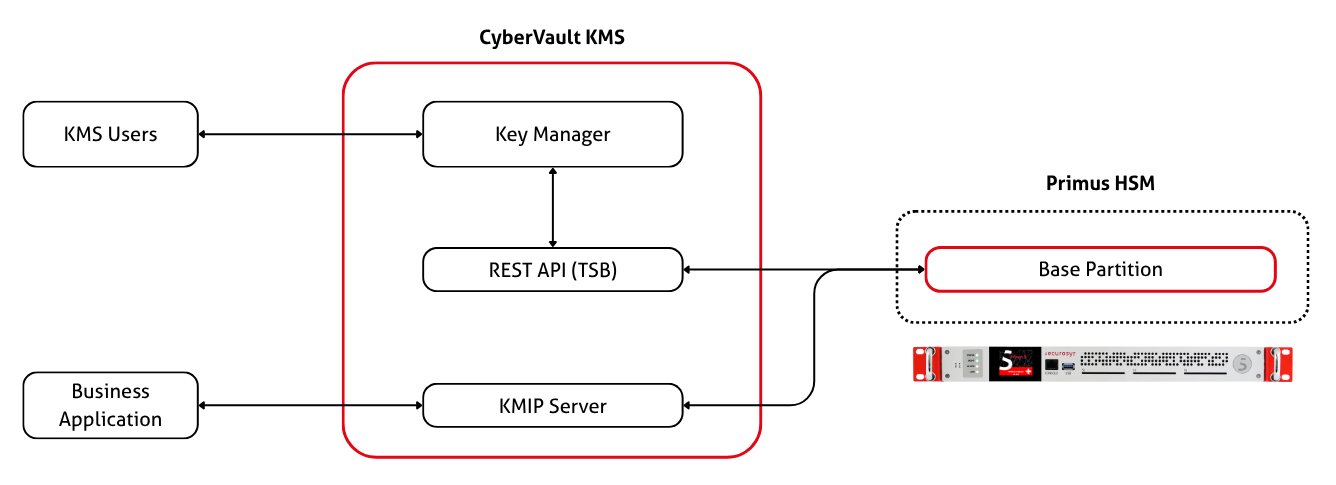
Object Naming Scheme
Everything the Key Manager creates/reads/writes is named kms.<area>.<object>.
These are the objects described on this page.
Any other data object on the Partition is either:
- Created by the Key Manager but owned by the KMIP Server
(
init.json,kmipserver.properties,KMIP-USERS, …) or - Owned by some other application connected to the Partition.
The following conventions are used:
- Dots separate parts of a name. A hyphen joins words inside one
part, as in
kms.discovery.latest-scan. - When a family of objects has an index and members, the index object is plural (
kms.users) and each member is singular plus its identifier (kms.user.<username>).
The kms. object label prefix is reserved. Do not give your own keys a label starting with kms.!
The Key Manager treats such labels as internal system objects and hides them from the key list by default.
KMS Data Objects
CyberVault KMS creates and uses the following data objects:
kms.config.public
kms.secret.*
kms.users
kms.user.<username>
kms.partitions
kms.partition.<id>
kms.config.public
Use this object when you want to inspect the non-secret platform configuration.
Conceptually:
{
  // Non-secret runtime configuration.
  "schema_version": 1,
  "general": { "...": "..." },
  "jwt": { "...": "..." },
  "oauth": { "...": "..." },
  "totp": { "...": "..." },
  "kmip": { "...": "..." },
  "llm": { "...": "..." },
  "mcp": { "...": "..." },
  "audit": { "...": "..." },
  "notifications": { "...": "..." },
  "syslog": { "...": "..." }
}
// No secret values are stored here.
kms.secret.*
Use these objects when you want to inspect admin-managed secret types.
Current secret objects:
kms.secret.tsb
kms.secret.oauth.microsoft
kms.secret.oauth.github
kms.secret.oauth.keycloak
kms.secret.llm
kms.secret.audit
kms.secret.smtp
kms.secret.syslog
Fields by object:
kms.secret.tsb               -> access_token of the base-partition
kms.secret.oauth.microsoft   -> client_secret
kms.secret.oauth.github      -> client_secret
kms.secret.oauth.keycloak    -> client_secret
kms.secret.llm               -> api_key
kms.secret.audit             -> signing_key_password
kms.secret.smtp              -> password
kms.secret.syslog            -> ca_cert, client_cert, client_key
Conceptually:
{
  // One object per secret type.
  "v": 1,
  "type": "oauth.microsoft",
  "version": 3,
  "fields": {
    "client_secret": {
      // Protection class for this field.
      "mode": "ml-kem-only",
      "updated_at": "2026-05-29T08:00:00Z",
      "updated_by": "admin",
      "envelope": {
        "...": "encrypted field payload"
      }
    }
  },
  "updated_by": "admin",
  "updated_at": "2026-05-29T08:00:00Z"
}
// Plaintext secret values are not stored directly in the object.
Important note:
ml-kem-onlymeans application-side envelope protectionska-gatedmeans the field is wrapped behind SKA-approval-gated key (SKA policy is enforced by the HSM)kms.secret.audit.signing_key_passwordis the main secret that defaults toska-gated
kms.users
Use this object when you want to inspect the user index.
Conceptually:
{
  // Username -> HSM data object key.
  "users": {
    "alice": "kms.user.alice"
  },
  "version": "3.0"
}
This object is an index only. It does not hold user passwords, TOTP secrets, or partition credentials.
kms.user.username
Use these objects when you want to inspect an individual user record.
Conceptually:
{
  "username": "alice",
  // bcrypt hash, not plaintext password.
  "password_hash": "$2a$10$...",
  "provider": "hsm_auth",
  "role": "admin",
  "partitions": [
    {
      // Reference only, not inline credentials.
      "id": "9b8d0a6c4d3147f1a2b3c4d5e6f70809",
      "default": true,
      "color": "#e30613"
    }
  ],
  // Shared TOTP secret.
  "totp_secret": "JBSWY3DPEHPK3PXP",
  "totp_pending": false,
  "recovery_codes": [
    // Stored as hashes, not plaintext recovery codes.
    "4f5c..."
  ],
  "enabled": true,
  "created_at": "2026-05-29T08:00:00Z"
}
Important note:
- local user passwords are stored as bcrypt hashes
- recovery codes are stored as hashes
- user records do not contain inline partition
api_urloraccess_token
kms.partitions
Use this object when you want to inspect the partition registry index.
Conceptually:
{
  // Partition ID -> HSM data object key.
  "partitions": {
    "9b8d0a6c4d3147f1a2b3c4d5e6f70809": "kms.partition.9b8d0a6c4d3147f1a2b3c4d5e6f70809"
  },
  "version": "1.0"
}
// This index is plaintext because it stores only IDs and object references.
This object helps you discover which concrete partition objects exist.
kms.partition.id
Use these objects when you want to inspect a concrete shared partition entry.
Logical content:
{
  "id": "9b8d0a6c4d3147f1a2b3c4d5e6f70809",
  "display_name": "Production",
  // Secret-bearing partition connection details.
  "api_url": "https://tsb.example.local",
  "access_token": "eyJ...",
  "color": "#e30613",
  "description": "Primary production partition",
  "created_at": "2026-05-29T08:00:00Z",
  "updated_at": "2026-05-29T08:10:00Z",
  "created_by": "admin"
}
// This is the logical content, not the at-rest wrapper.
At rest, the stored object is a sealed wrapper:
{
  // Stored in the HSM data object.
  "v": 1,
  "envelope": {
    "...": "encrypted partition payload"
  },
  "updated_at": "2026-05-29T08:10:00Z"
}
// The sensitive partition entry is inside the envelope.
Important note:
kms.partition.<id>is the place to look for stored partition credentials- at rest, those credentials are sealed and not visible as plaintext fields
KMIP Data Objects
When the KMIP Server add-on is used, additional data objects exist on the Base Partition. They fall into two groups:
- Objects that the KMIP Server itself reads (but that are created by the Key Manager).
- Book-keeping objects owned by the Key Manager.
Objects read by the KMIP Server
| Label | Description |
|---|---|
init.json | Seed of KMIP users, groups, and privileges. Only loaded when the KMIP Server database is empty (first start or after reinitialization). |
kmipserver.properties | KMIP Server configuration (HSM Partition credentials). Changes to this requires a KMIP Server restart. |
server-keystore.p12 | KMIP Server TLS key and certificate. |
server-truststore.p12 | mTLS client truststore. Pins the KMIP User CA and any imported client certificates. |
kmip-fixture.add-user.<username> | New KMIP client entry, automatically applied to KMIP Server database. |
kmip-command.delete-user.<username> | Deleted KMIP client entry, automatically applied to KMIP Server database. |
KMIP-USERS | Index of KMIP clients |
KMIP-User-<username> | Record per KMIP client |
These names are set by the KMIP Server, so they do not follow the kms. naming
convention and cannot be changed.
Because the KMIP Server reads kmipserver.properties, server-truststore.p12,
and init.json only at startup, some changes stay pending until it is restarted.
The Key Manager tracks this in kms.kmip.state.
Objects owned by the Key Manager
| Label | Type | Description |
|---|---|---|
kms.kmip.state | data object | KMIP bookkeeping; see below. A kms.kmip.state.new object may appear briefly while the state is being written, and is cleaned up automatically. |
kms.kmip.user.<username> | key | Client key per KMIP client. Special case: kms.kmip.user.ca for the KMIP User CA. |
kms.kmip.user.<username> | certificate | Client certificate for a KMIP client. |
kms.kmip.state
Read this object to inspect the Key Manager's KMIP book-keeping, most importantly the restart-pending state behind the restart banner in the UI.
Conceptually:
{
  "version": 1,
  "updated_at": "2026-07-25T08:00:00Z",
  // Present while a KMIP Server restart is required; absent otherwise.
  "restart_pending": {
    "pending": true,
    "kind": "truststore",
    "reason": "client \"alice\" was imported and its certificate pinned in the truststore; ...",
    // Deployment-specific restart command shown to the operator.
    "command": "docker compose restart kmip-server",
    "since": "2026-07-25T07:59:00Z"
  },
  // Partition IDs whose KMIP object groups exist on the KMIP Server.
  "provisioned_groups": ["9b8d0a6c4d3147f1a2b3c4d5e6f70809"],
  // Client deletions that are applied at the next restart.
  "pending_delete_commands": [],
  // Operator-defined KMIP Server profiles.
  "profiles": []
}
The restart_pending.kind states are:
keystore- the running KMIP Server serves outdated TLS material. Auto-clears once the server presents the current certificate.config-kmipserver.propertieschanged. Cleared by an operator restart.truststore- an imported client certificate was pinned. Cleared by an operator restart.wipe- a change that a plain restart cannot apply. The KMIP Server must be reinitialized (stop, drop its database volume, start); the required steps are shown in awipe_commandfield.
Other objects on the partition
Besides the families above, the Key Manager creates the objects and keys below. These are completely internal and are not intended for inspection during normal operation.
Note that some entries are keys rather than data objects, so they appear in a key listing instead of a data object listing.
| Label | Type | Description |
|---|---|---|
kms.seal.wrapper | key | Wrapping key that the unseal flow uses to recover the master key |
kms.seal.pubkey | data object | Public half published by the key-rotation flow |
kms.profile.cert | data object | Certificate profiles |
kms.profile.ska | data object | SKA profiles |
kms.tenant.<id>.wrapper | key | Per-tenant RSA key that wraps that tenant's data-object envelopes |
kms.tls.<service> | data object | Per-service TLS bundle, envelope-encrypted |
kms.discovery.targets | data object | Configured discovery targets |
kms.discovery.latest-scan, kms.discovery.scan-history | data object | Discovery scan results |
kms.compliance.profile.<name> | data object | Compliance profiles |
kms.selftest.* | key, data object | Start-up self-test fixtures |
Objects created by other Securosys components may also be present, for
example approver-mgmt-backup-key-rsa-wrapping and timestamp-key. The Key
Manager only recognises these so that it can keep them out of the keys list;
it never writes them.
Operator summary
When using the TSB Data Object inspection APIs:
- look at
kms.config.publicfor non-secret runtime configuration - look at
kms.secret.*for admin-managed secret types - look at
kms.usersto discover user object names - look at
kms.user.<username>for user-specific MFA and password-hash state - look at
kms.partitionsto discover partition object IDs - look at
kms.partition.<id>for sealed partition connection entries - look at
kms.kmip.statefor the KMIP restart-pending state and bookkeeping
Anything else beginning with kms. is internal state covered under
other objects on the partition.
Anything not beginning with kms. was written by the KMIP Server or by
another Securosys component, not by the Key Manager.
If an object contains an envelope or per-field secret envelope, the sensitive value is stored in protected form rather than as plaintext JSON.