How It Works
This page explains how the Securosys Key Manager operates internally.
The Securosys Key Manager is built on top of the Securosys REST API, which connects directly to Securosys Hardware Security Modules (HSMs).
The Key Manager User Interface allows to manage cryptographic keys and their lifecycles, while applications consume these keys through one of the Primus API Providers (KMIP, PKCS#11, JCE, MSCNG, or REST API).
Architecture
The Securosys Key Manager UI is designed with a layered architecture that separates key lifecycle management from key usage:
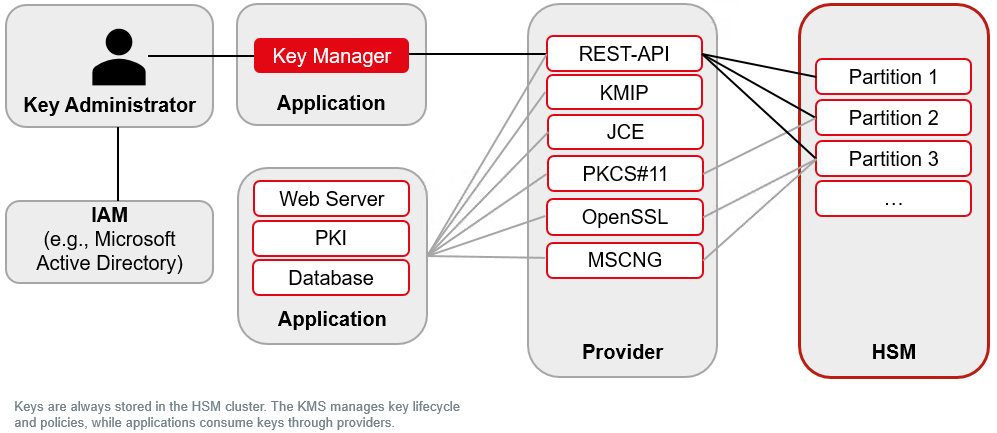
- Key Administrators authenticate via IAM systems (e.g., Microsoft Entra ID, Keycloak) or local HSM credentials, and access the Key Manager to create, manage, and enforce policies on cryptographic keys.
- The Key Manager communicates with the Securosys REST API, which provides the secure interface to the underlying HSM cluster.
- Keys are always generated and stored inside the HSM cluster. The app manages metadata, policies, approvers, and lifecycles, but the secret key material never leaves the HSM.
- Applications (e.g., web servers, PKI, database encryption) use the keys through standard providers such as KMIP, PKCS#11, JCE, MSCNG, or REST API.
- The HSM cluster provides secure partitions, ensuring strong isolation, scalability, and high availability.
Main Principles
The Securosys Key Manager UI is built upon the following principles:
-
Keys reside on the HSM
- Keys are generated, stored, and used in the HSM. Secret material never leaves the HSM.
- For performance, the Key Manager UI may cache non-sensitive metadata such as key labels.
-
UI focuses on management, not usage
- The Key Manager UI primarily manages key lifecycles, policies, and certificates.
- Applications perform routine key operations (encryption, signing, decryption) via the standard HSM APIs.
- The UI does provide certificate issuance (CSR creation, self-signed certificates, CSR signing) and includes a Self-Test module for validating cryptographic operations across all supported algorithms.
-
Lightweight, HSM-backed architecture
- The application is delivered as a Docker container image.
- It requires no external database - all persistent state (user accounts, partition credentials, configuration) is stored as HSM data objects on the HSM partition itself.
- It can be run in a cold-room (no internet connection, e.g., for key ceremonies) when using HSM-based authentication and a locally accessible HSM.
- All it needs is a REST API endpoint through which it can access the HSM.
Authentication
The Securosys Key Manager has two authentication layers:
- Human Access – Controls access to the Key Manager UI. Multiple authentication options are available.
- Machine Access – Secures communication between the Key Manager UI and the HSM REST API (TSB).
Human Access
When configuring, clients must decide if they prefer HSM authentication or managed authentication (Microsoft, GitHub, Keycloak).
Managed Authentication:
- Microsoft Entra ID
- Keycloak
- GitHub
- Purpose: Enterprise-grade SSO using OAuth 2.0 and OpenID Connect.
- Use Case: Recommended for production environments using Microsoft 365.
- Features: Optional group-based access filtering via
allowed_group_id. - Setup: Register an Azure AD app. → See Microsoft Entra ID configuration with Docker, or Kubernetes / Helm.
- Purpose: Enterprise SSO using OpenID Connect via Keycloak.
- Use Case: Recommended for organizations with an existing Keycloak deployment.
- Features: Optional role-based access filtering via
allowed_role; supports multi-tenancy by mapping Keycloak roles to HSM partitions. - Setup: Configure a Keycloak client. → See Keycloak configuration with Docker, or Kubernetes / Helm.
- Purpose: OAuth-based login via GitHub accounts.
- Use Case: Development and testing environments.
- Features: Optional organization-based access filtering via
allowed_organization. - Setup: Similar to other OAuth providers using OAuth secrets and redirect URI.
HSM Authentication:
- Purpose: Password-based login managed directly by the Key Manager.
- Use Case: Suitable for development, isolated on-premise, or air-gapped environments.
- Setup: Passwords are bcrypt-hashed and stored as HSM data objects on the HSM partition. → See Local Users configuration with Docker, or Kubernetes / Helm
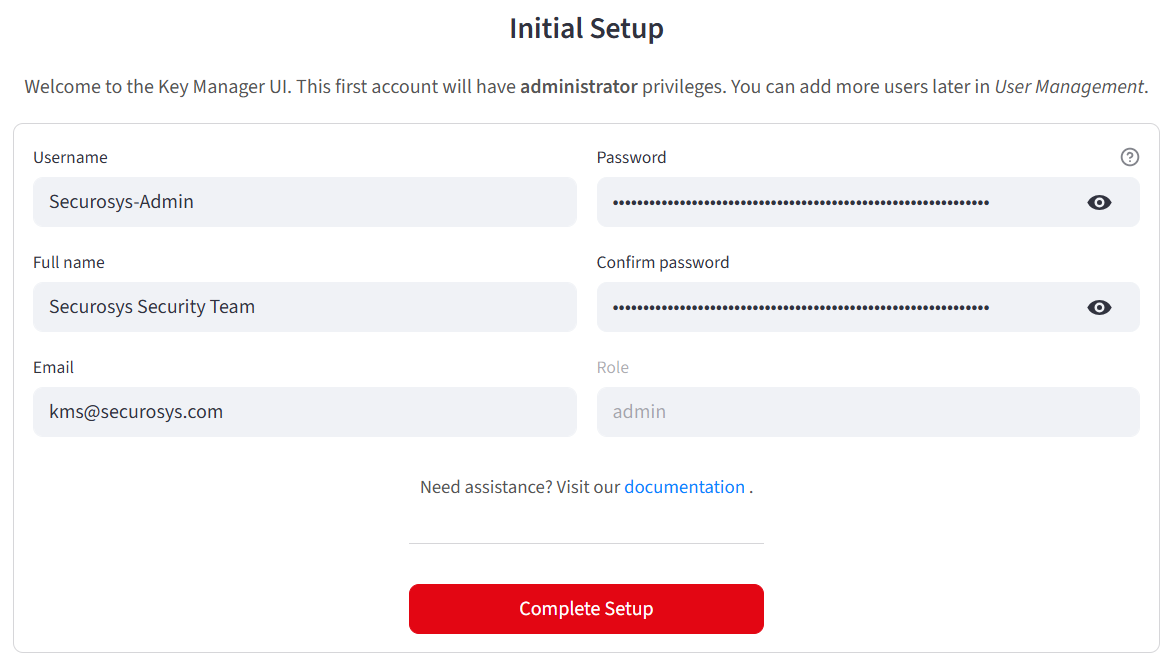
When using HSM Authentication, after starting up the application for the first time, you will be prompted to create your first user, who will be assigned the admin role.
Two-Factor Authentication (2FA)
The Key Manager supports TOTP-based two-factor authentication, compatible with authenticator apps such as Google Authenticator or Authy.
- 2FA can be configured as optional or mandatory for all users.
- TOTP secrets are stored securely as HSM data objects.
- Users enroll via QR code in the Security Settings page.
- Once enabled, 2FA verification is required periodically (every 12 hours by default).
Role-Based Access Control (RBAC)
The Key Manager enforces three role levels:
| Role | Description |
|---|---|
| Admin | Full access to all features, including user management, key/certificate operations, and system configuration. |
| User | Can create, manage, and use keys and certificates, but cannot manage other users. |
| Readonly | Read-only access to keys, certificates, and system status. Cannot create, modify, or delete resources. |
Roles are assigned during user creation (HSM auth) or mapped from OAuth provider attributes (e.g., Keycloak roles, Microsoft Entra ID groups).
Machine Access
The Key Manager authenticates with the HSM REST API using following methods.
- Mutual TLS (mTLS)
- JSON Web Tokens (JWT)
- API Keys
- Purpose: Bidirectional authentication between the Key Manager and the HSM/TSB.
- How It Works: The Key Manager presents a client certificate and private key; both sides verify trust.
- Optional: Use an OCSP responder for live certificate validation. → See mTLS Docker configuration, or Kubernetes.
- Purpose: Stateless, token-based authentication for REST API access.
- Requirement: Mandatory for CloudHSM; optional but recommended for on-premise deployments without mTLS.
- Note: JWT can be combined with mTLS for enhanced security.
- Purpose: Simple, role-based authentication for automated or service-to-service operations.
- Features: Scoped permissions, key rotation, and independent revocation. → See API Keys Configuration Guide.
For more details, see the REST API authentication documentation.
In production, use Microsoft Entra ID or Keycloak for user access and mTLS (optionally combined with JWT)
for backend authentication.
During development, use HSM Authentication and API Keys for testing and automation.
Multi-Tenancy
The Key Manager supports multi-tenancy through HSM partition isolation, allowing multiple teams or organizations to share a single Key Manager deployment while maintaining strict separation of cryptographic material.
- Partition switching: Authenticated users can switch between HSM partitions at runtime via the sidebar partition selector.
- Credential storage: Per-user partition credentials can be stored in:
- HSM data objects (on a management partition)
- Azure Key Vault
- Google Cloud Secret Manager
- Role-based partition mapping: When using OAuth providers (Microsoft Entra ID, Keycloak), partitions can be automatically mapped from user roles or group memberships.
- Visual isolation: Each partition can be assigned a display name and color indicator in the sidebar for easy identification.