Key Manager Initial Wizard
After the installation, the Key Manager web interface guides you through the first-run setup: initialize, unseal, and create the first administrator account. Open the dashboard URL in a browser and follow the instructions on the screen.
The Initial Wizard is only offered if no KMS state exists on the connected HSM Partition. If the KMS was ever installed for this Partition before, any new installation will read the existing data objects and resume from that state.
Steps
Step 1: Initialize. On the first start, the Key Manager prepares its sealed state on the HSM Partition. This happens automatically and takes up to a minute. If it cannot complete, for example because the TSB is not reachable yet, the page offers an Initialize button to retry manually. How the sealed state is stored is described in State & Secrets.
Step 2: Unseal. Click Trigger unseal. The service becomes active after a few seconds. If the seal is protected by an SKA policy, the unseal waits until the HSM approvers have approved the request; this can take minutes. Upon success, the page reports Service is ACTIVE and forwards to the login page.
Step 3: Create the first administrator. Since no account exists yet, the login opens the Initial Wizard screen:
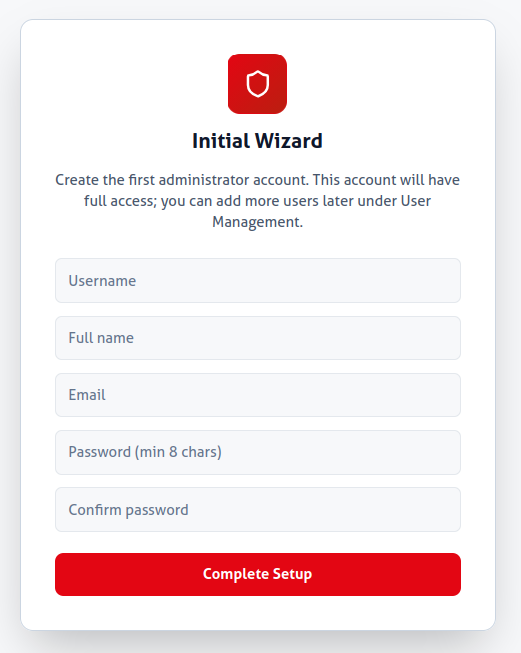
- Username: 3 to 32 characters; lowercase letters, digits, dot (
.), underscore (_), hyphen (-). - Full name and Email: optional.
- Password: at least 8 characters, entered twice.
- Role: fixed to Admin; the first account is always an administrator.
Click Complete Setup. The account is created and you are signed in. The HSM Partition of the deployment is registered automatically and assigned to the new account as the default Partition.
There is no self-service password reset. A lost password can only be reset by another Admin account, so create a second administrator or store the credentials securely.
Next Steps
- Add more user accounts and assign roles and Partitions under Administration > Users.
- Start configuring the Key Manager.