Installation
This guide goes over the prerequisites for connecting your Securosys KMIP Server to your MongoDB instance. Additionally, it explains how to install and configure your Master Keys and how to manage their lifecycle.
This page does not go over the installation and configuration of a MongoDB instance. It assumes that you already have a MongoDB running and will not go over how to set it up.
Instead, it will focus on how to add the Securosys KMIP Server to the cluster as the key-manager.
If you already have an unencrypted database cluster that contains data and would like to protect it
with your Securosys HSM or CloudHSM, continue reading this page up to and including
configure your MongoDB nodes with enableEncryption: true
and then complete the encryption an existing cluster tutorial.
Prerequisites
Ensure that you meet the following prerequisites before starting
- A
MongoDB Enterprise Advancedlicense (KMIP-based key management is an Enterprise feature) - CyberVault KMS v1.1.0 or later (includes the KMIP Server)
- Network connection between the MongoDB nodes and the KMIP Server on port 5696 (default)
Enable Key Export on the Partition
Enable the "key export" and "key extraction" settings in the Partition Security Config of your HSM Partition. This must be done by the HSM administrator and requires (Partition) Security Officer privileges. This is required so that the master key can be extracted.
- PSO
- UI
- Console
User Config ➜ Edit ➜ (setting)
For the following settings:
- Key Export
- Key Extraction
Setup ➜ Configuration ➜ Security ➜ User Security ➜ (User) ➜ (setting)
For the following settings:
- Key Export
- Key Extraction
hsm_user_enter_config

hsm_user_list_config key_export
hsm_user_list_config key_extract

hsm_user_set_config key_export=true
hsm_user_set_config key_extract=true

hsm_user_exit_config
Create KMIP Client
Create a new KMIP client in CyberVault KMS. Download the client credentials as PEM and extract the ZIP. You need the following files:
kmip-client-combined.pem- Client certificate and client keykmip-server.pem- Server CA certificate
Configuring MongoDB
Add the encryption and KMIP settings to the security block of each node's mongodN.conf configuration file.
If your MongoDB environment is a cluster of multiple nodes, you need to define
the same security block in the configuration files of all nodes.
Otherwise, you risk exposing your database by leaving some nodes unencrypted and storing your data in plaintext.
security:
  enableEncryption: true
  encryptionCipherMode: AES256-CBC
  kmip:
    serverName: <kmip-host>
    port: 5696
    clientCertificateFile: /path/to/kmip-client.pem
    serverCAFile: /path/to/kmip-server.pem
    # keyIdentifier: <key-label-from-HSM>
| Setting | Purpose |
|---|---|
enableEncryption | Turns on the WiredTiger encrypted storage engine |
encryptionCipherMode | AES256-CBC (default) or AES256-GCM (Linux only) |
serverName / port | The KMIP Server details |
clientCertificateFile | The combined client certificate + key PEM (absolute path) |
serverCAFile | The CA that signed the KMIP Server certificate (absolute path) |
keyIdentifier | Optional key label to use a defined, pre-created key. |
On first startup with this configuration, MongoDB requests the KMIP Server to create the master key
(unless keyIdentifier is specified).
On subsequent startups, MongoDB retrieves the existing key and decrypts the local database keys.
Verification
Start the node, then confirm encryption is active at three levels: the key exchange, the service, and the data on disk.
mongod --config ~/mongodb/mongod1.conf
1. Confirm the master key was retrieved
A healthy start shows the encryption key being retrieved, Encryption key manager initialized with a key identifier,
and Waiting for connections.
Record the key identifier - it is the handle to this deployment's master key on the HSM.
grep -iE 'Waiting for connections|encryption key|key manager initialized' /path/to/mongod.log | tail
Sample MongoDB logs:
"Requesting encryption key from key manager"
"Successfully retrieved encryption key"
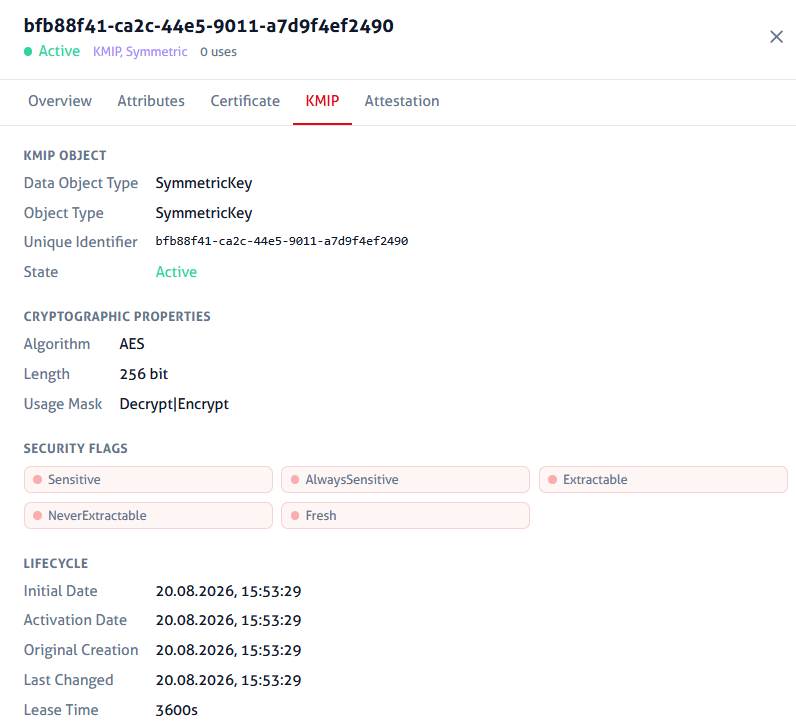
"Encryption key manager initialized","attr":{"keyId":"bfb88f41-ca2c-44e5-9011-a7d9f4ef2490"}
In the HSM logs, the retrieval is logged as follows:
Cryptography Secret key exported: User: PARTITION_KMS, Client: kmip_1@e6d902ba, Connection: 268463115 (10.0.0.42:39424), Protocol: jce, Type: AES, Name: bfb88f41-ca2c-44e5-9011-a7d9f4ef2490
In CyberVault KMS, the key appears like this:
2. Confirm the service accepts connections
mongosh --port 27017 --eval 'db.runCommand({ping:1})'
This should return { ok: 1 }, showing that the node is up and running.
If the KMIP Server was not reachable, the node is unable to start.
3. Confirm the data is encrypted on disk
Insert a unique marker and flush it to disk:
mongosh --port 27017 --eval '
db.getSiblingDB("test").canary.insertOne({marker:"UNIQUE_CANARY_STRING"});
db.adminCommand({fsync:1});'
At the end of the command above we invoke fsync:1 to force a sync to the collection data immediately.
Otherwise, the data may not have reached its next checkpoint (roughly every 60s).
Then search the raw storage files for that marker:
grep -rl 'UNIQUE_CANARY_STRING' /path/to/dbPath/ \
  && echo 'FOUND - encryption NOT working' \
  || echo 'NOT FOUND - encryption working'
NOT FOUND is the expected result.
The marker is readable through MongoDB, because the server decrypts on read,
but the WiredTiger data files on disk contain only ciphertext.
This test greps the raw storage files, not MongoDB documents. That is to simulate someone inspecting the raw bytes on a stolen disk. The marker itself is an ordinary document when inserted; the grep just reads the file underneath it.
For a rigorous demonstration, run the same insert and grep against a second node started without enableEncryption.
The marker will be found there, proving the grep would catch plaintext if it were present.
Troubleshooting
Below you can find some of the common issues when trying to initiate encryption and their respective solutions.
Nodes unable to start
Log message:
child process failed, exited with 1
The fork option hides the reason. Read the log directly to see the underlying error:
tail -n 25 /path/to/mongod.log
Node starts but data is readable on disk
enableEncryption is not in effect.
Confirm the setting is present in the configuration file the node actually loaded,
and that the log shows the encryption key being retrieved at startup.
TLS handshake fails
Verify return codeis non-zero. Check if the CA chain inserverCAFileis incomplete or wrong.- The handshake fails only after a host resume. Check for clock drift and sync the clock.