Configuring AD CS for PQC
This article describes how to configure Active Directory Certificate Services (AD CS) certification authorities (CAs) to use Module-Lattice-Based Digital Signature Algorithm (ML-DSA) for Post-Quantum Cryptography (PQC).
AD CS supports ML-DSA across the certificate lifecycle—CA hierarchy setup, leaf certificate issuance, and OCSP response signing. Each scenario links to the corresponding configuration guide.
For further details see What is ML-DSA support in AD CS?.
Primus CNG/KSP Provider v1.60 and later supports post-quantum cryptography (PQC) algorithms. This requires a compatible version of Windows, Windows Server, .NET or AD CS.
Select Microsoft AD CS Cryptographic Provider
To integrate the Securosys HSM with Microsoft Active Directory Certificate Services the Primus KSP/CNG Provider must be specified. This is usually done during installation of the Certificate Authority and can be done either via Graphical User Interface (GUI) or the Command Line Interface (CLI).
Please read through the Prerequisites and the Installing CNG Provider sections as they are required for further steps.
- GUI
- CLI
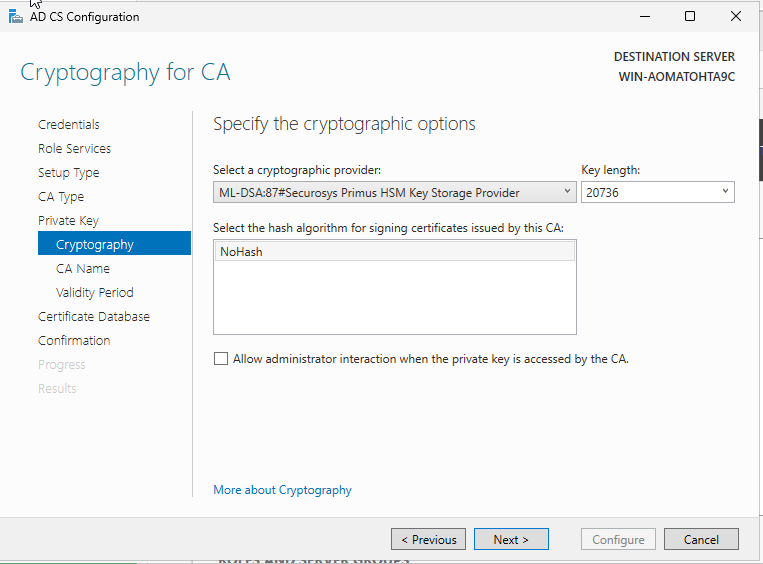
When selecting the Provider on the Cryptography for CA window, select one of the following:
- ML-DSA:44#Securosys Primus HSM Key Storage Provider
- ML-DSA:65#Securosys Primus HSM Key Storage Provider
- ML-DSA:87#Securosys Primus HSM Key Storage Provider
Key length and hash algorithm cannot be changed.
When using an existing private key you will be required to specify your existing key before selecting the Key Storage Provider.
Example of selecting the Securosys Primus Key Storage Provider:
- Using new certificate and private key. Run the following command in PowerShell:
# KeyLength is specified in bits.

# For Standalone Root CA (recommended for production)
Install-AdcsCertificationAuthority -CAType StandaloneRootCA -CACommonName "<your-root-ca-name>" -KeyLength 20736 -HashAlgorithm NoHash -CryptoProviderName "ML-DSA:87#Securosys Primus HSM Key Storage Provider"

# For Enterprise Root CA (lab and test environments)
Install-AdcsCertificationAuthority -CAType EnterpriseRootCA -CACommonName "<your-root-ca-name>" -KeyLength 20736 -HashAlgorithm NoHash -CryptoProviderName "ML-DSA:87#Securosys Primus HSM Key Storage Provider"
Proceed by configuring your CA to use the ML-DSA generated inside your Primus HSM or CloudHSM. For more details see, Configure a certification authority to use ML-DSA