Troubleshooting
NSS Account Registration
For GCP deployments, your Cloud Volumes ONTAP instance must be registered with a NetApp Support Site (NSS) account to receive license assignments.
Verify NSS Account Registration:
- Navigate to: Console Administration Support NSS Management
- Verify that you have an NSS user registered
If you don't have a valid NSS account, contact NetApp Support to create one.
Troubleshooting NSS Account Issues:
If you encounter the following error when adding an NSS account:
{"error":"E009","message":"Invalid NSS credentials - not full access account"}
This indicates your NSS account lacks the required privileges. Contact NetApp Support to upgrade your account to a full-access support account.
Register Cloud Volumes ONTAP Instance
Once your NSS account is configured, register your Cloud Volumes ONTAP instance:
- Navigate to: Console Storage Management
- Double-click your
Cloud Volumes ONTAPinstance - Go to: Features Support Registration
- Complete the registration using your NSS account
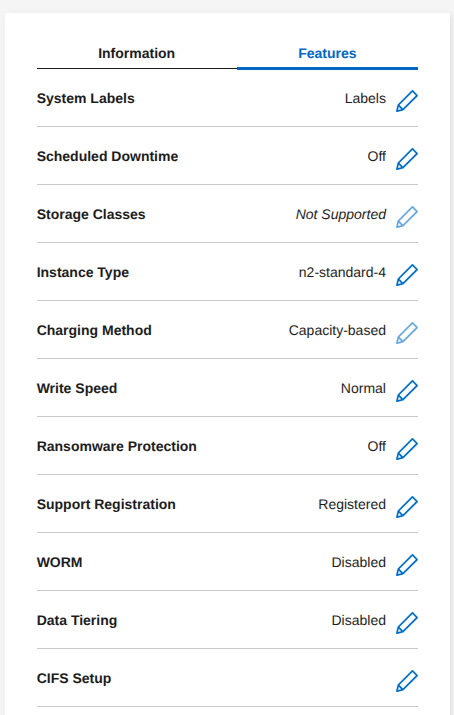
Note: Support registration is required for license activation and to enable technical support for your Cloud Volumes ONTAP instance.
Network Connectivity Error
If you encounter a connection failure to the KMIP server:
Error: command failed: The following issues were found:
Unable to establish secure connection to KMIP server
"kmip-server.cloudshsm.com". Cryptsoft error: "I/O Error".
Diagnosis steps:
Cluster01::> set -privilege advanced
Cluster01::> network ping -destination <IP_address> -vserver <vserver_name>
kmip-server.cloudshsm.com is alive
Verify outbound connectivity from the ONTAP host to the KMIP server. If the KMIP server is unreachable, check the following:
- Firewall rules allowing traffic to KMIP server port 5696
- Network routing and security groups
- For GCP Compute Engine deployments: verify that your VM instance has a public IP address assigned
- DNS resolution for the KMIP server hostname
Missing License Error
If volume encryption operations fail due to licensing issues:
Queueing for encryption conversion operation failed for volume "svm_securosys_root". Reason:
Package "VE" is not licensed in the cluster.
Resolution:
Verify that the Volume Encryption (VE) license is installed and active on your cluster, contact NetApp Support, Volume Encryption License is always included:
Cluster01::*> license show

Package           Type     Description           Expiration          CustomerID
----------------- -------- --------------------- ------------------- ----------
VE                license  Volume Encryption License