Auto-Unseal with PKCS#11
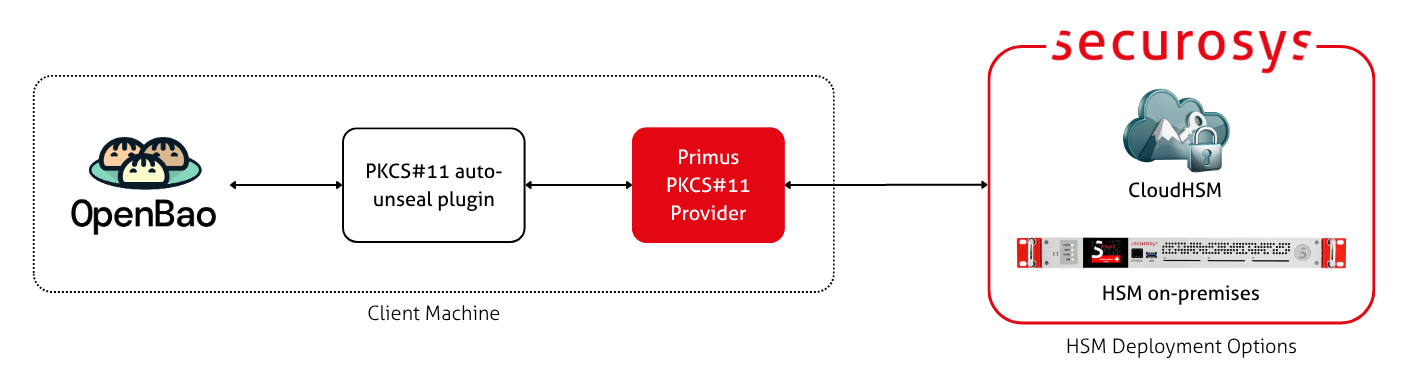
This guide describes how to set up auto-unsealing of an OpenBao instances with Primus HSM through PKCS#11.
Prerequisites
- A Securosys Primus HSM or CloudHSM.
- You need: HSM URL/IP, PKCS#11 port, Partition name, Setup Password, PKCS#11 password.
- An OpenBao installation.
- This can be an existing installation (to be migrated to auto-unsealing) or a fresh, uninitialized installation.
- See the OpenBao installation guide for instructions.
This guide requires OpenBao 2.6.0 (or later) because it uses the
new kms plugin type.
Step 1: Install the Primus PKCS#11 Provider
Install the Primus PKCS#11 Provider on the same machine as the OpenBao server.
The bao process will need read access to the PKCS#11 provider.
In native Linux installations, this means that you need to add the openbao user to the primus group:
sudo usermod -aG primus openbao
If you deploy OpenBao in a container (Docker, Podman, Kubernetes, ...), you need to
mount the relevant files into the container (libprimusP11.so, primus.cfg, and .secrets.cfg).
Step 2: Create a key in the HSM
OpenBao does not automatically generate the key in the HSM.
Create the unseal key using pkcs11-tool (or a similar tool).
pkcs11-tool --module "/usr/local/primus/lib/libprimusP11.so" \
  --token-label "PARTITION_NAME" \
  --pin "PKCS11_PASSWORD" \
  --keygen \
  --key-type aes:32 \
  --label "bao-root-key-aes" \
  --sensitive \
  --undestroyable
| Argument | Description |
|---|---|
--module | Path to the PKCS#11 module |
--token-label "PARTITION_NAME" | Name of your HSM Partition |
--pin "PKCS11_PASSWORD" | PKCS#11 password. Provided by your HSM administrator. |
--keygen | Command to generate a key. |
--key-type aes:32 | Specifies an AES-256 key. To use RSA, specify rsa:4096 and swap --keygen for --keypairgen. |
--label "bao-root-key-aes" | Sets the label of the key in the HSM. |
--sensitive | Sets the CKA_SENSITIVE attribute, preventing the key from being revealed in plaintext. |
--undestroyable | Unsets the CKA_DESTROYABLE attribute, preventing the key from being deleted. |
See the PKCS#11 key management tutorial for more command variations.
If you lose this key, you will not be able to unseal your OpenBao instance, and will thus lose your OpenBao data. Make sure that you have a backup of your HSM Partition.
The command above sets destroyable=false, which prevents the key from being deleted via the API.
When set, the only way to delete this key is to delete the entire Partition.
If you don't set destroyable=false, you should enable Key Invalidation
in your Partition.
Step 3: Configure the pkcs11 plugin
Next, install the kms-pkcs11 plugin.
This is a vendor-agnostic plugin maintained by the OpenBao community.
The simplest installation option is to declare the following in your openbao.hcl.
This causes OpenBao to automatically download the plugin when OpenBao (re)starts.
The releases and their SHA-256 digests can be found in the
openbao-plugin repository.
Make sure that the plugin_directory exists on your machine.
When using containers, make sure this directory is persisted as a volume mount.
plugin_directory = "/opt/openbao/plugins"
plugin_auto_register = true
plugin_auto_download = true

plugin "kms" "pkcs11" {
  image       = "ghcr.io/openbao/openbao-plugin-kms-pkcs11"
  version     = "v0.1.0"
  binary_name = "openbao-plugin-kms-pkcs11"
  sha256sum   = "55245882727535579e710672f0eae1bcdddc846006db857baaa6e09e33d40faf"
}
See the OpenBao plugin system
and the plugin stanza
documentation for more information about plugin installation.
Step 3: Configure the pkcs11 seal
Define the PKCS#11 seal in the OpenBao configuration:
seal "pkcs11" {
  lib         = "/usr/local/primus/lib/libprimusP11.so"
  token_label = "PARTITION_NAME"
  key_label   = "bao-root-key-aes"
  mechanism   = "CKM_AES_GCM"
  # pin       = "PKCS11_PASSWORD"
}
To avoid hard-coding the PKCS#11 Password/PIN in the configuration file,
you can set it via the BAO_HSM_PIN environment variable.
Step 4: Initialize OpenBao
Finally, (re-)start OpenBao so that it picks up the configuration changes.
Then initialize OpenBao to create the seal:
bao operator init
This returns:
Recovery Key 1: mQA3ASf8P/9S...
Recovery Key 2: Q9pYb3Ge+9a6...
Recovery Key 3: vRt0uHy1ms0e...
Recovery Key 4: IBL3zUtDe+kj...
Recovery Key 5: UK9GSdqpzXEy...

Initial Root Token: s.dCmfe4zmwxmsEE...

Success! Vault is initialized

Recovery key initialized with 5 key shares and a key threshold of 3. Please
securely distribute the key shares printed above.
Securely note down the recovery keys and the root token!
If your instance is already initialized with another seal, follow the seal migration guide to migrate to the PKCS#11 seal.
Confirm Working Auto-Unsealing
To test that auto-unseal is working, restart OpenBao. In the OpenBao logs, you should see the following, indicating a successful auto-unseal ("stored unseal key"):
systemd[1]: Started openbao.service - "OpenBao - A tool for managing secrets".
bao[154960]: 2026-07-31T10:59:30.458+0200 [INFO]  core: stored unseal keys supported, attempting fetch
bao[154960]: 2026-07-31T10:59:30.597+0200 [INFO]  core.cluster-listener.tcp: starting listener: listener_address=0.0.0.0:8201
bao[154960]: 2026-07-31T10:59:30.599+0200 [INFO]  core.cluster-listener: serving cluster requests: cluster_listen_address=[::]:8201
bao[154960]: 2026-07-31T10:59:30.600+0200 [INFO]  core: post-unseal setup starting
bao[154960]: 2026-07-31T10:59:30.606+0200 [INFO]  core: loaded wrapping token key
bao[154960]: 2026-07-31T10:59:30.606+0200 [INFO]  core: upgrading plugin information: plugins=[]
bao[154960]: 2026-07-31T10:59:30.606+0200 [INFO]  core: successfully setup plugin catalog: plugin-directory=/opt/openbao/plugins
bao[154960]: 2026-07-31T10:59:30.606+0200 [INFO]  core.plugins: starting declarative plugin registration
bao[154960]: 2026-07-31T10:59:30.610+0200 [INFO]  core.plugins: declarative plugin registration completed
bao[154960]: 2026-07-31T10:59:30.816+0200 [INFO]  core: post-unseal setup complete
bao[154960]: 2026-07-31T10:59:30.816+0200 [INFO]  core: vault is unsealed
bao[154960]: 2026-07-31T10:59:30.816+0200 [INFO]  core: unsealed with stored key
Additionally, bao status should show:
$ bao status
Key                      Value
---                      -----
Seal Type                pkcs11
Recovery Seal Type       shamir
Initialized              true
Sealed                   false
Total Recovery Shares    5
Threshold                3
Version                  2.6.1
Commit Date              2026-07-22T14:22:20Z
Storage Type             file
Cluster Name             vault-cluster-38522aac
Cluster ID               cee4e2e1-c4ba-616b-88f7-4d12ac69e6a8
HA Enabled               false