Primus HSM - Configuration
After the initial setup the HSM can be configured to suit your use case. There is a large number of available settings, divided into the following top-level categories:
An overview of these sections is given below. For detailed description of available options, values, and defaults, please see the Primus HSM User Guide.
How to Edit the Configuration
The configuration can be done through any of the management interfaces:
- The console (either via serial or via SSH)
- The front panel display
- The Decanus terminal
On all of these interfaces, the configuration options can be changed either:
- Manually, by editing the individual options, or
- Automatically by loading an XML configuration file containing the definitions. The flow is: export file, edit it, import it again. See section 3.8 "Configuration with XML Export and Import" of the Primus HSM User Guide.
- Front Panel & Decanus
- Console
- Setup Configuration Import / Export Security Config Export
- Setup Configuration Import / Export Security Config Import
hsm_sec_export_config
hsm_sec_import_config
Network Configuration
Within the network configuration, the interface, IP addresses, and port values can be configured for services such as:
- API processes (JCE, PKCS#11, MSCNG)
- High Availability
- Remote Administration (Decanus)
- NTP, SNMP, and logging
And other configuration such as:
- URL / IP settings
- Routing
- Interface Redundancy
- Bonding
- WebDAV Server
The network settings can be changed with only the Device Login Password.
- Front Panel & Decanus
- Console
- Setup Configuration Network
hsm_net_list_config
hsm_net_set_config key=value
HSM cluster network example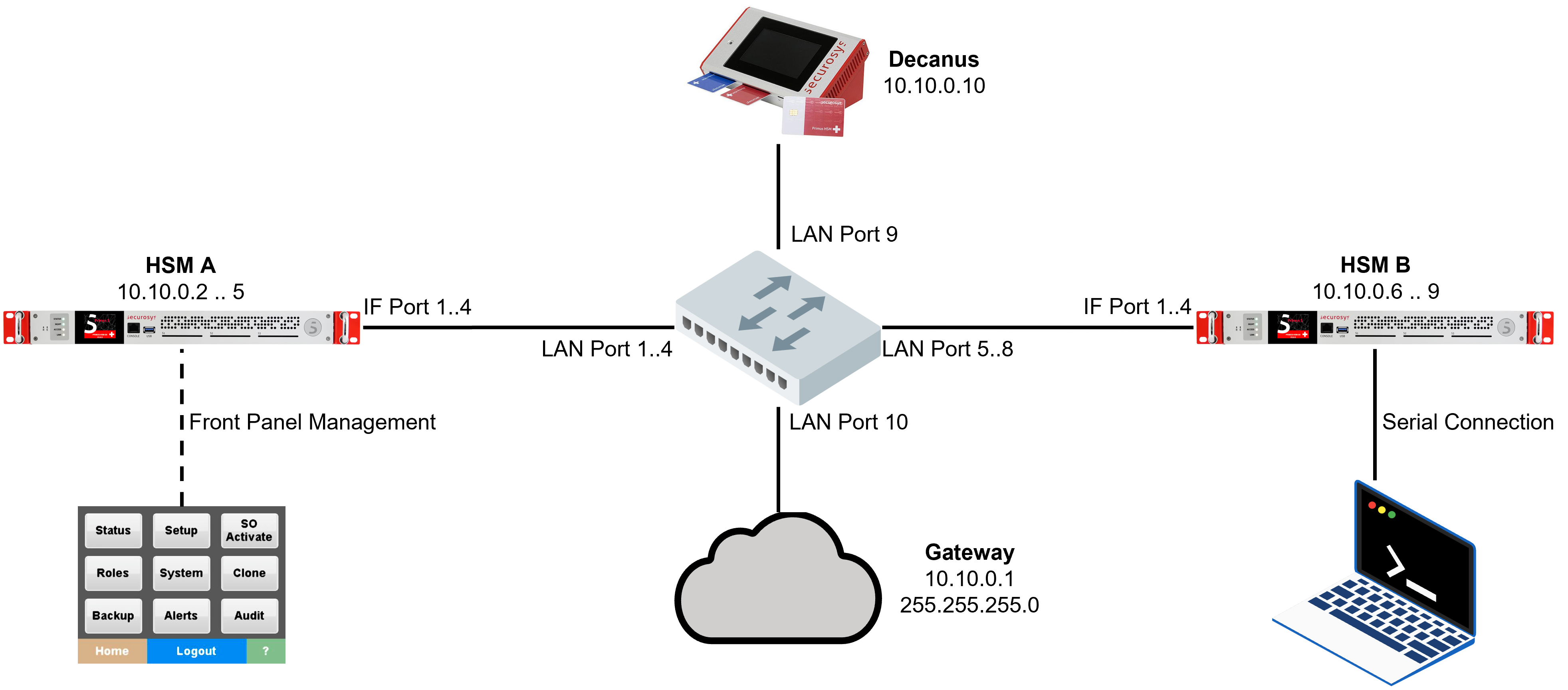
Security Configuration
The security configuration defines all the security-relevant settings. These can only be changed by the (Partition) Security Officer (PSO/SO).
The security configuration includes the following sections:
- Device Security:
- Device Policy: login password, allowing backup/restore, manual/remote cloning, ...
- Crypto Policy: User/Partition-related settings, such as API access (JCE, PKCS#11, MSCNG), key import/export, key invalidation, ...
- Management Policy: management-related settings, such as SNMP, SO Configuration, logging, SSH, ...
- Master Security: cluster parameters, such as HA Master URL
- User Security: Per-User (Partition) configuration. If enabled this overrides the device crypto policy.
- Front Panel & Decanus
- Console
- XML
- Setup Configuration Security Device Security
- Setup Configuration Security Master Security
- Setup Configuration Security User Security
hsm_sec_list_config
hsm_sec_set_config key=value
...
<crypto_process>
  ...
  <import_keys>disabled</import_keys>
  <export_keys>disabled</export_keys>
  <extract_keys>disabled</extract_keys>
  ...
</crypto_process>
User Security Configuration
With the User Security Configuration, administrators can define security settings on a per-Partition level. This allows having individual settings for a Partition, differing from the device-wide settings and differing from other Partitions. It works as follows:
-
When disabled, the device-wide settings apply (those from Device Security Crypto Policy). By default, the User Security Configuration is disabled for every new Partition.
-
When enabled, it overrides the Device Security Configuration. For example, if "Key Export" is disabled in Device Security but enabled in User Security, then key export is allowed for this specific Partition.
- The only exception to this are 1) the native APIs (JCE, PKCS#11, MSCNG) and 2) "Client API Access". They must be enabled both in Device Security and in User Security for them to be allowed.
The Security Officer can enable the User Security Configuration for a specific User/Partition:
- Front Panel & Decanus
- Console
- XML Configuration File
- Setup Configuration Security User Security User name User Configuration
Enter the specific User configuration:
hsm_user_enter_config
Then enter the User name followed by ENTER. After that the prompt will indicate the User name. E.g.
hsm_user_enter_config

Enter username:

SO >>> PART001

SO : PART001 >>>
Then run:
hsm_user_list_config use_usr_cnf
hsm_user_set_config use_usr_cnf=true
Each Partition has a configuration section starting with <crypto_user state="enabled">:
  ...
  <crypto_user state="enabled">
    <user_name>PART001</user_name>
    ...
  </crypto_user>
If it shows state="enabled", then the User Security Configuration is active.
The Partition Security Officer (PSO) role can be used to grant someone permission to edit the User Security for a single Partition.
See section 3.9 "Individual User Configuration" of the Primus HSM User Guide.
Logging Configuration
Primus HSM is continuously logging events using the following logs:
- System Log (syslog)
Contains non-sensitive events like network status, temperature, load, diagnostics, etc. to be sent to and analyzed by system and network monitoring tools. - Security/Audit Log (crypto log)
Includes the system log plus sensitive and security relevant events like SO operations, configuration changes, key creation/changes, client logins/activity, etc. for audit trail analysis and archiving. - Partition Specific Log (Security/Audit log)
if required, an independent dedicated log area can be activated per Partition, which is stored in a reserved area of that Partition so that the log cannot be flooded by events of other partitions. The log consists of the Security/Audit Log of the specific Partition. - Unplanned Restarts Log (crash.log)
Contains information of unplanned restarts due to power-off, watchdog, and other outages.
The logs can be accessed in two ways:
- Log streaming: Logs can be streamed to a remote syslog server (such as Splunk or Elastic Search). Securosys also provides a free Splunk app for log analysis.
- Local export: The log files can be exported to storage (USB or WebDAV).
The current syslog reference can be found in section 15.7 "Logging References" of the Primus HSM User Guide.
Partition Specific Logging
Partitions can optionally store a copy of the security/audit log that contains only events relevant to this Partition. This is a full copy, and therefore counts towards the total storage space of the Partition.
The Partition specific log must be explicitly activated in the Device Security or User Security:
- Front Panel & Decanus
- Console
- XML
- Device Security: Setup Configuration Security Management Policy Client API User Log
- User Security: Setup Configuration Security User Security User name Client API User Log
Device Security:
hsm_sec_list_config client_log
hsm_sec_set_config client_log=true
User Security:
hsm_user_enter_config
hsm_user_list_config client_log
hsm_user_set_config client_log=true
hsm_user_exit_config
...
<crypto_process>
  ...
  <import_keys>disabled</import_keys>
  <export_keys>disabled</export_keys>
  <extract_keys>disabled</extract_keys>
  ...
</crypto_process>
Partition specific logs can be read out via the client APIs.
- JCE
- REST
- PKCS#11
PrimusDevice.getHsmLog()
GET /v1/hsm/log
ppin --fetchlog --user <user partition name> --hsm <hsm or host name> [--reverse] [--since YYYY-MM-DD] [--out <file>]