Prepare the Salesforce Cache-Only Key Service
Before you can start setting up the Securosys Proxy for Salesforce Cache-Only Key Service, you need to prepare a few things on the Salesforce side. This guide shows how to do that.
Salesforce BYOK Certificate Background
The Salesforce Cache-Only Key Service uses key wrapping to securely deliver a key from an external KMS or HSM to Salesforce. Wrapping is done using hybrid public key encryption with JSON Web Encryption (JWE). This means that a key is encrypted (wrapped) under a public key before it leaves the Cache-Only Key Proxy. The corresponding private key is held by Salesforce, enabling it to decrypt the wrapped key once it has reached the Salesforce environment.
Salesforce's public key is delivered in form of the Salesforce BYOK Certificate. In this step, you will create a public-private key pair in Salesforce. You can download the public key in form of a self-signed certificate. Alternatively, you can download a Certificate Signing Request (CSR), and obtain a CA-signed certificate from an external CA.
In a later step, you will configure the BYOK Certificate on the Securosys Cache-Only Key Proxy. This enables the proxy to securely wrap the key before sending it to Salesforce.
The key (aka. the Data Encryption Key, DEK) is exported from the HSM in plaintext and is wrapped by the Cache-Only Key Proxy. Therefore, you must securely deploy the Cache-Only Key Proxy.
Obtain a Salesforce BYOK Certificate
Follow the Salesforce documentation and create a BYOK Certificate (aka. BYOK-Compatible Certificate). Download and store the certificate file.
For your convenience, we repeat the steps below:
- From
Setup, in theQuick Findbox, enterPlatform Encryption, and then selectKey Management. - Click
Bring Your Own Key. - Click
Create Self-Signed Certificate. - Enter a unique name for your certificate in the
Labelfield. TheUnique Namefield automatically assigns a name based on what you enter in theLabelfield.- The Exportable Private Key (1), Key Size (2), and Use Platform Encryption (3) settings are preset.
For a BYOK Certificate, you must select 4096 for the key size.
These settings ensure that your self-signed certificate is compatible with Salesforce Shield Platform Encryption.
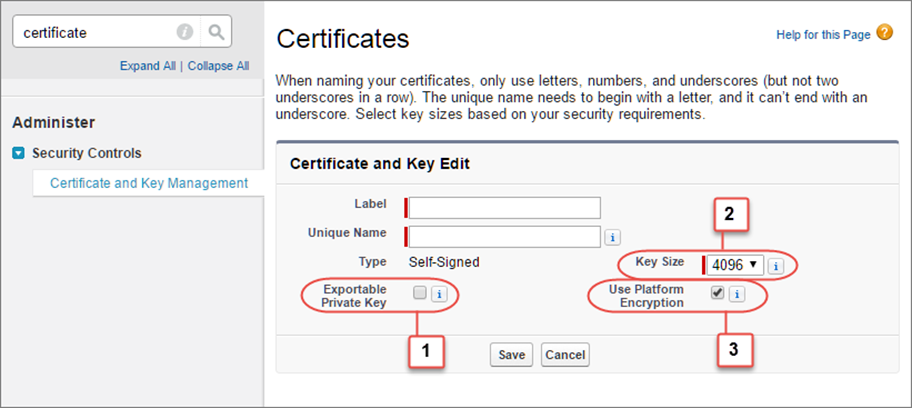
- Example:

- The Exportable Private Key (1), Key Size (2), and Use Platform Encryption (3) settings are preset.
For a BYOK Certificate, you must select 4096 for the key size.
These settings ensure that your self-signed certificate is compatible with Salesforce Shield Platform Encryption.
- When the
CertificateandKey Detailpage appears, clickDownload Certificate. The certificate will be downloaded as a.crtfile.