ServiceNow Bring Your Own Key (BYOK)
This integration allows keys to be generated, wrapped, and exported from a Securosys CloudHSM Partition or an on-premise Primus HSM, and then imported into ServiceNow as Customer Managed Keys (CMK) otherwise known as bring your own key (BYOK) concept.
ServiceNow Cloud Encryption Platform is a key management and encryption framework that enables customers to protect data across the ServiceNow platform using customer-managed encryption keys. It allows organizations to generate, import, and control cryptographic keys that are used to encrypt ServiceNow data, while ServiceNow manages the encryption and decryption operations within the platform. The platform supports secure key import workflows and modern cryptographic algorithms, ensuring that sensitive data remains protected and compliant with regulatory and internal security requirements.
Securosys CloudHSM and Primus HSM are hardware security modules (HSMs) that enable customers to generate, store, and manage cryptographic keys under their exclusive control. Securosys CloudHSM is provided as a cloud service, eliminating the need to manage HSM procurement, setup, operation, redundancy, and maintenance, while offering scalable and highly available HSM clusters. Primus HSM provides the same security guarantees in an on-premise deployment model.
Both Securosys CloudHSM and Primus HSM integrate with the ServiceNow Cloud Encryption Platform by enabling secure generation keys and wrapping of keys. This integration allows customers to retain full ownership and control of their encryption keys while using ServiceNow’s native encryption capabilities.
How It Works
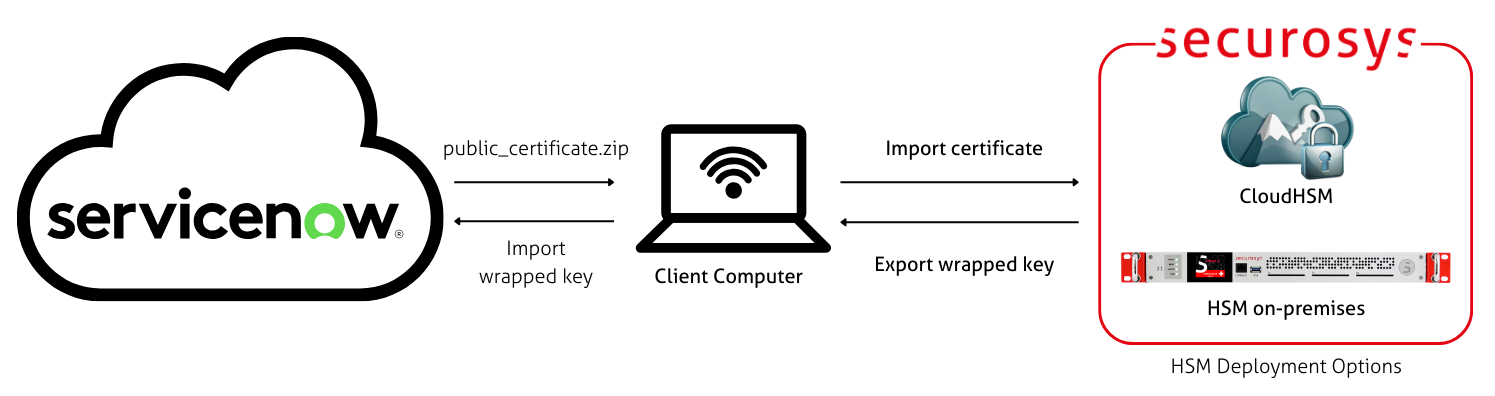
When using BYOK with ServiceNow Cloud Encryption Platform, an AES-256 key is generated inside the Securosys HSM controlled by the customer. This is the customer managed key.
To securely "bring" this key from your HSM to ServiceNow, wrapping is used. An RSA public key certificate provided by ServiceNow is imported into the HSM. The HSM wraps the AES-256 key using RSA-OAEP and exports the wrapped key for import into ServiceNow. ServiceNow then unwraps the AES key and uses it for its encryption operations.
This flow only has to be done once to bring a key to ServiceNow. It can be done using the following Primus API Providers: REST, JCE, PKCS#11.
Next Steps
Follow the installation guide for step-by-step instructions for bringing your keys to ServiceNow.