Introduction to using the TSB for SKA
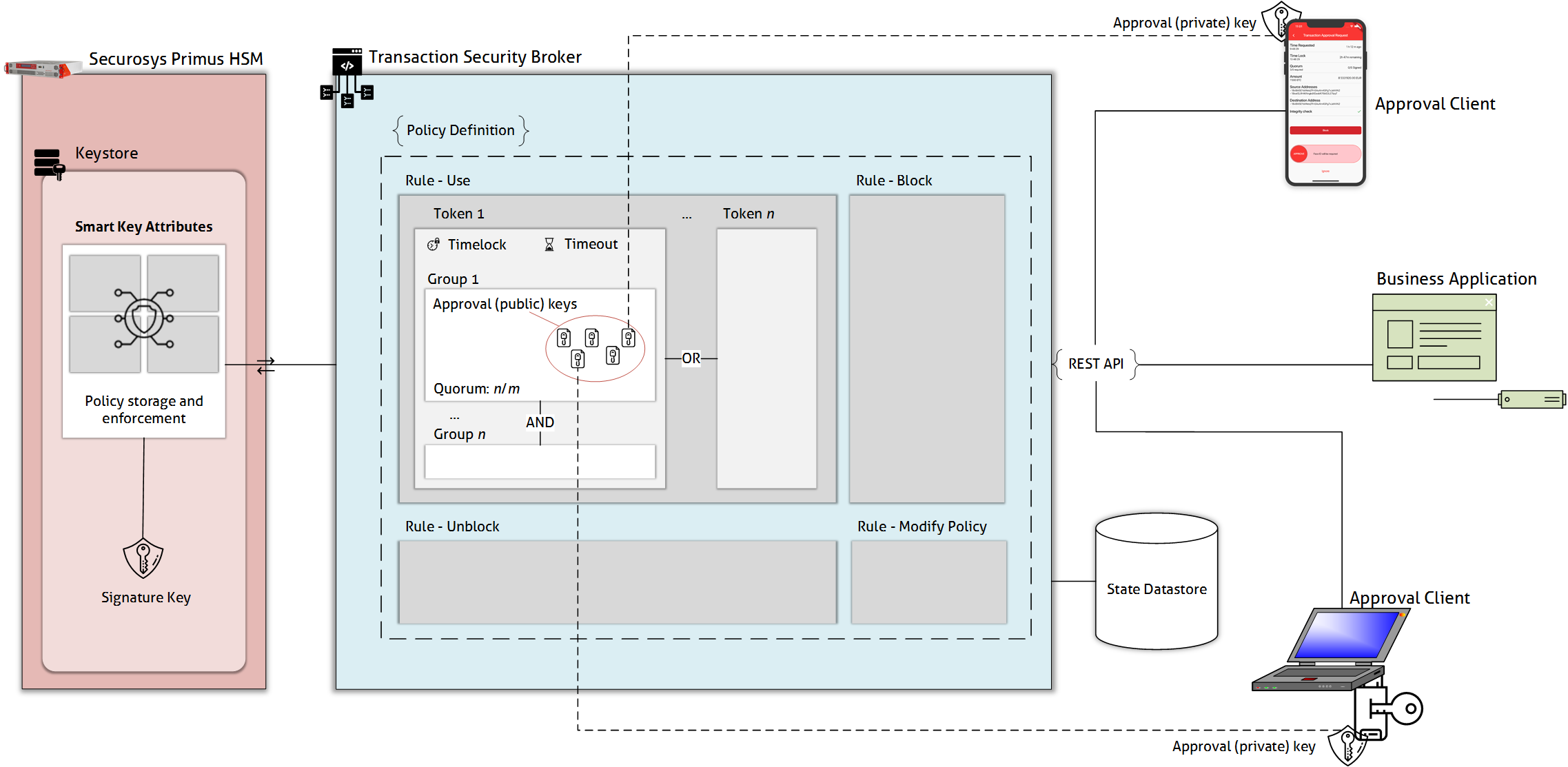
Recall from the initial introduction that apart from being a REST-to-JCE translation layer, the TSB also includes support for Smart Key Attribute (SKA) workflows. In particular, the TSB includes a workflow engine and approver management.
In such a setup, the TSB is responsible for managing the state of SKA key operations, such as managing approvers, collecting signatures from all approvers, and forwarding them to the HSM.
What are Smart Key Attributes?
Smart Key Attributes bring multi-authorization rules to private keys stored on Securosys HSMs. For example, applications can define authorization policies using quorums (n-of-m approvers need to approve a key usage), timelocks, and timeouts.
We recommend reading the dedicated Smart Key Attribute (SKA) section before proceeding with the TSB guide. The other pages in this guide assume you understand the high-level concepts of SKA.
Why a Workflow Engine?
When using SKAs, a business application needs to collect authorizations from multiple different approvers, both human and automated (such as VaultCode). Applications may also need to wait for a certain amount of time to pass, if the SKA policy specifies a timelock. This requires keeping state. The collected authorizations need to be stored while the missing, remaining authorizations are collected. Only once all requirements of the SKA policy are fulfilled can the complete request be made to the HSM.
Therefore, Securosys introduced the TSB. The TSB sits between the business application and the HSM and handles the logic for collecting all parts of a multi-authorization. This is the workflow engine. For more details on the workflow, see this article.
Technically, it is possible to implement workflow management yourself. In this case, you directly call the JCE API with the complete, fulfilled approvals. This gives you greater flexibility, especially if your SKA policies are simple (such as 1-of-1 quorums).
However, if you have multiple approvers, you need logic to notify approvers, collect approvals, and keep state. The TSB's workflow engine already provides this.
Why Approver Management?
Additionally, the TSB implements approver management. As such, the TSB has features to:
- Keep an inventory of approvers that are attached to SKA policies.
- Create new approver key pairs with HSM randomness, and inject the approver key pairs into approver apps, such as the Securosys Authorization App.
- Back up the approver key pairs to allow recovery when approvers lose their phone. The backups are encrypted under a TSB system key and are stored in the database.
You can use the Workflow Engine without using the built-in Approver Management.
The Workflow Engine automatically discovers the approvers that are listed in the policy of an SKA key. This makes it possible to use the Workflow Engine with approvers that are managed elsewhere, outside of the TSB.
Architecture
What's next?
The articles in this TSB guide will explain how to use SKAs with the TSB:
- How to create SKA keys,
- How to create and manage approvers for SKA keys, and
- How to integrate with the Securosys Authorization App.