Custom Algorithms
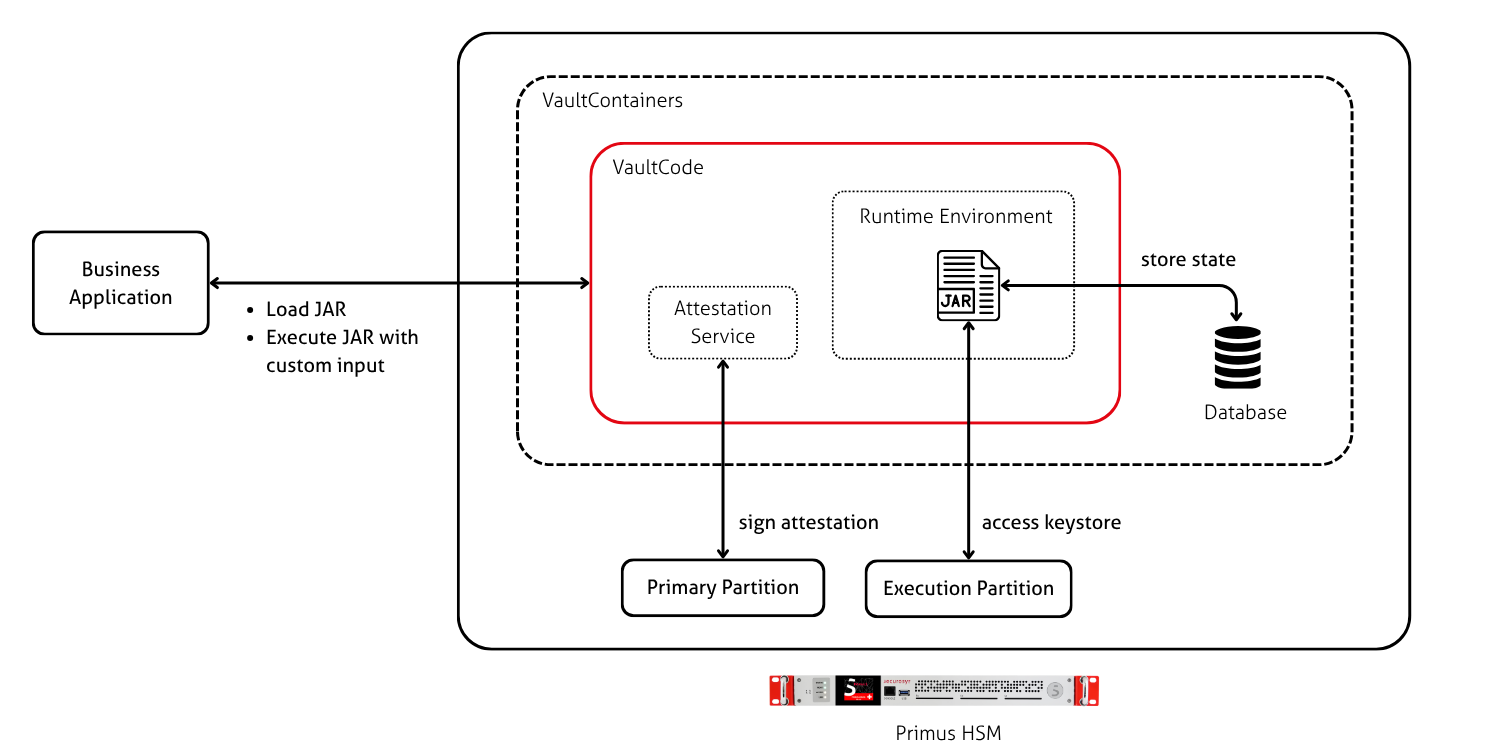
Executing custom code inside VaultCode also includes custom cryptographic algorithms. You can implement your custom cryptography in any JVM-compatible language, load it as a JAR to VaultCode, and execute it within the secure HSM boundary.
By configuring an Execution Partition, the custom JAR in VaultCode gets access to an HSM Partition. Once connected, your code can use the Partition to:
- Peform standard operations (generate, sign/verify, encrypt/decrypt, wrap/unwrap, derive).
- Extract (export) key material from the Partition.
- Store/load data objects to persist arbitrary data.
The ability to export key material is what allows you to implement custom cryptographic algorithms. For example, you could generate an AES-256 key, export its secret key material, and then perform operations on it (within the confines of VaultCode). Additionally, you can use data objects to persist application data.
The native HSM clustering mechanism takes care of synchronizing the Partition data to all devices in the cluster.
Exporting Key Material
In order for your JAR to obtain the raw key material from the Partition, your keys must be exportable. This means that you:
- Must mark the keys as
extractable=trueandsensitive=falseat creation time. - Must enable "Key Export" and "Key Extraction" in the Partition Security Config of your Partition.
- Must not use SKA keys.
For more details, see the Exporting Objects guide.
Security Considerations
As VaultCode runs on the VaultContainers system inside the HSM, the runtime state of your custom JAR never leave the boundaries the device. This protects your keys while your JAR has them in memory.
However, because your keys are exportable, you must ensure that your Partition can never be accessed from outside the VaultContainers system. This can be ensured in two complementary ways:
- Only create Setup Passwords that you deploy to VaultCode.
Make them single use (
setup_password_lifespan=0in the Partition Security Configuration). Never create and use Setup Passwords for anything else. - Disable API access for traffic originating outside the HSM. To do this, set
vault_containers=trueandjce_allowed=false,mscng_allowed=false,pkcs_allowed=falsein the Partition Security Configuration. This requires HSM firmware 3.3.4 or later.
This keeps your keys safe, while allowing you to run custom algorithms against your keys.
Limitations
By design, VaultCode is not able to communicate with the outside world. This means that multiple VaultCode instances cannot communicate with each other (for example, to perform multi-party computation or other interactive algorithms). If you require orchestration between instances of your code, you need to deploy an external orchestration layer, running outside and on top of VaultCode.