Veeam Backup & Replication with KMIP
Veeam is a leader in data resilience, backup, recovery, portability and security. With Veeam Backup & Replication (VBR) platform companies are able to define, configure, schedule, execute, and restore backups of their infrastructure.
Securing these backups is therefore as critical of a component in the flow, as the backup itself. With Securosys Primus HSM or CloudHSM you can securely keep the backup encryption keys in tamper-protected hardware.
Securosys KMIP Server is certified as Veeam Ready 🏆. With this certification, Veeam confirms that VBR has been successfully tested to work with Securosys HSMs.
Architecture
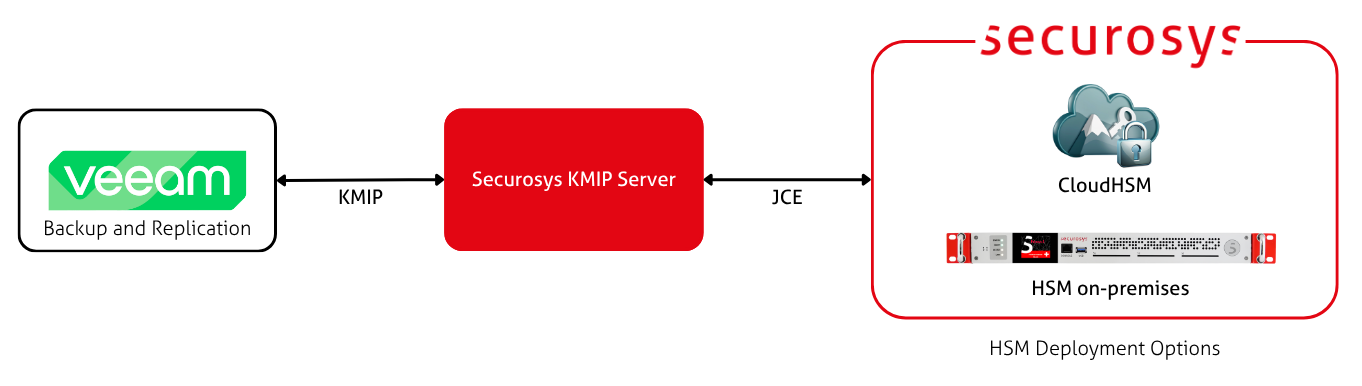
Veeam Backup & Replication (VBR) can connect to a KMS or an HSM using the Key Management Interoperability Protocol (KMIP). The Securosys KMIP Server acts as the translation layer between KMIP and Primus HSM's native JCE API. Through KMIP, VBR can create and use HSM-backed keys.
How it works
Initialization: Through KMIP, VBR requests an asymmetric key pair to be generated on the HSM for every new storage or backup job. Veeam exports the public key and stores it in its database. The private key never leaves the boundaries of the Securosys HSM.
Backup: When creating a backup, VBR locally creates a Data Encryption Key (DEK) and uses it to encrypt the backup data. Veeam then locally encrypts the DEK using the public key (that was previously created in the HSM and cached in the database). Therefore, encryption works without needing the HSM (assuming the key pair already exists).
Restore: When a restore is requested, VBR connects to the KMIP Server and requests the encrypted DEKs to be decrypted with the private key. Using the recovered DEKs, Veeam then locally decrypts the backup data. This decryption process happens automatically and is transparent to the user.
The following jobs and repositories do not support data encryption with KMS keys:
- Configuration backup jobs
- Veeam Agent backup jobs managed by Veeam Agents
- Backup repositories that store backup files created by Veeam Agents operating in the standalone mode
Getting Started
Veeam provides the VBR as part of the Veeam Software Appliance. It can be installed on Linux or Microsoft Windows Server. To begin, visit the installation page.
Further Reading
- Read more about how Veeam performs Data Encryption.
- Installation options are available on Veeam's Products Download page.
- Learn more about Configuring Veeam Backup & Replication.